Showing posts with label Microsoft Windows. Show all posts

Thursday, January 28, 2010

Does Windows need more padding to fend off Apple's iPad?

As the author of a blog that’s “All About Microsoft,” I watched yesterday’s Apple iPad unveiling with interest — as many Microsoft employees, partners and customers did, given that Apple is Microsoft’s only viable competitor in the PC operating space.


Most interesting to me, after all the Twitter and live blogging dust settled, were the various calls for Microsoft’s response. I read a few blog posts and tweets claiming Apple’s move really boxed in Microsoft and its partners. More than a few Tweeters called for Microsoft to rush out its rumored next-generation slate, codenamed Courier, to blunt the iPad’s impact. And then there was Nick Carr’s “The PC Officially Died Today.” (An odd way to look at things, given that the iPad is being billed as an addition to Apple’s PC line-up, not a replacement for Macs.)

Microsoft “response” to the iPad is Windows 7. Windows 7 on slates, tablets and other small form factors created by various PC makers. Like the iPad, many of these devices provide touch capabilities, access to productivity apps and the ability to consume music, photos, video, ebooks and other kinds of content. Unlike iPads, many also include tools for creating content, too, plus various social-networking tools and built-in keyboards. Even netbooks — supposedly beneath Apple, but as of yesterday, acknowledged by CEO Steve Jobs as an iPad competitor — can do what the iPad can (and more), though not as “elegantly” or quickly.

Some of Microsoft critics — but also some of its backers — think Windows 7, as it currently exists, isn’t enough of a response. It doesn’t really matter whether CE, Windows or Windows Mobile inside (the iPad runs the iPhone OS), they argue. What matters more is the fact that Windows 7 isn’t optimized for slate-like devices. Touch is enabled, but as a curiosity, not as the primary way a user would interact with the device, they say. Microsoft — or some vendor — needs to create a shell/user interface that sits on top of Windows 7 that turns it into a slate-centric machine, some claim.

I wouldn’t be surprised if Microsoft has a team somewhere working on that very task. (I asked recently and was told the Softies had nothing to say there.) Or maybe Windows 8’s UI will be NUIfied (natural-user-interfaced) so that it makes touch more of a first-class input citizen. Or perhaps if and when the Windows Mobile team delivers a touch experience that people actually like (hello, Zune), some of that technology/influence could make its way into Windows…

Michael Cherry, an analyst with Directions on Microsoft, said he doesn’t expect any major shifts from Redmond because of the iPad.

“As to what Microsoft will do, I suspect that they will continue to push their tools and languages, and that whether it is Windows 7 or Windows CE it is still Windows, even though for devices, I think that downplaying Windows elements such as the start button, menus, and other Windows UI components is the way to go,” Cherry said. “When I look at an iPhone or an iPad, even I, an OS junkie, never say ‘Wow, I want that phone it runs Apple OS X.’ I have never bought a TiVo because it runs whatever OS it runs, I buy it because it really makes it easier to record the programs I want to watch. I have looked at a Windows Mobile device and rejected it because I don’t want to begin navigation of the features from a start menu. What an unnecessary hassle particularly with touch.”

I’ve written before that I’m not a fan of device convergence, as I’d rather have several different devices that do one or two things well than one that does a bunch of things in an OK way. Will an iPad replace a PC? Not in its current incarnation. A mobile phone? Nope — too bulky. An ebook reader? Unless it can beat Amazon’s prices and offer a non-back-lit reading experience with better battery life, not in my book (or one New York Times writer’s, either). It’s a device without a compelling purpose.

In spite of those calls for Microsoft to retaliate, I’m sure the biggest response from yesterday’s unveiling among Microsoft’s execs and partners was a sigh of relief…. especially given that Microsoft is due to report its second quarter fiscal 2010 earnings later today.
Read More

Tuesday, January 26, 2010

What Would Life Be Like Without Windows?

It's the thought experiment we all like to engage in. What would life be like without Microsoft Windows? To listen to the free open source software crowd, the demise of Windows -- and by extension, Microsoft's hegemony over the PC universe -- would signal a kind of rebirth for information technology. Software would finally be free of the corporate shackles that have stifled innovation and dragged down the best and brightest among us.
Such thinking is naïve, at best. Rather than freeing IT, the demise of Microsoft would plunge the industry into an apocalyptic tailspin of biblical proportions -- no visions of hippie utopia here. The withdrawal of the Redmond giant's steady hand would cause today's computing landscape to tear itself apart at the seams, with application and device compatibility and interoperability devolving into the kind of Wild West chaos unseen since the days of the DOS big three: Lotus, WordPerfect, and Ashton-Tate.

And don't believe that the Web will somehow mitigate the impact of Windows' demise. Although Google talks a good story about supplanting traditional compute models with a Web-centric paradigm, the truth is that the folks from Mountain View are no less sinister when it comes to grandiose plans for world domination. If anything, the rise of Google -- or any dominant cloud-computing player -- should be perceived as a potential threat to IT independence. As the saying goes, never put all your IT eggs into a single vendor's basket.

But come, let us ponder together the implications of a world without that shiny, four-colored Windows logo. A world where standards are fleeting and where creativity and innovation have run amok. A post-apocalyptic vision worthy of the full Roland Emmerich disaster porn treatment. Here, in the spirit of the History Channel's "Life after People" series, I present my vision of life after Windows.

Client applications: Kiss consistency good-bye The client application landscape will be almost unrecognizable in a post-Microsoft world. The deprecation of the legacy Windows API, coupled with the move to an entirely Web-based delivery model, will open the floodgates of innovation -- and create massive headaches for support personnel, who must now contend with the rich variety of UI designs and implementations that define the Web application experience.

Basically, you can kiss consistency good-bye. With developers free to create their own interface primitives, many arbitrary decisions will worm their way into the larger UI consciousness. Steps to complete even basic tasks -- for example, manipulating and formatting lists of data -- will vary widely among implementations. And while common Web metaphors (hyperlinks, form fields) will continue to function as expected, more exotic constructs -- like the Webified version of a tools palette -- will take on increasingly diverse modes of interaction. You'll still click on things (or, more likely, touch them on screen with a finger or stylus), but the resulting actions will be anything but predictable.

Cross-application integration will be another sore spot. With OLE/COM/VBA out of the picture, the job of linking data between disparate applications will fall to a mixture of JavaScript and various cloud-hosted APIs and resources. In some cases -- most notably, suites of applications from a single vendor -- this integration will occur seamlessly on the back end. However, without a robust, widely adopted standard for data exchange, such integration will be difficult to achieve between the various vendor-specific silos that will make up the future cloud computing fabric.

One bright spot in this post-Microsoft client application future will be the elimination of the traditional software distribution model. No longer will IT shops have to track and manage a huge library of installed, stand-alone applications. With everything streaming from the cloud, the days of corrupted MSI packages and nasty DLL-hell scenarios will become a distant memory. The flip side of this equation is that the capability of working "offline" will also become a thing of the past. Your entire application infrastructure will be wholly dependent on uninterrupted connectivity to the cloud, making the Internet itself your new single point of failure.

Bottom line: Expect increased support and training costs as users struggle to master common functions across disparate applications. You may also want to update your disaster planning to include the pre-apocalyptic nightmare scenario where a backhoe operator takes out your now cloud-dependent IT infrastructure with an errant swing of his mighty shovel.

Developer tools: Bloody purges and API turf wars will shape the new standards As with client applications, the developer tools landscape will be fundamentally altered by the inevitable decline of the Win32 API. Programmers will face a plethora of new and potentially critical design decisions, including how to create a workable UI in a world where the old Windows rules no longer apply. The potential for freedom of expression and true innovation will need to be balanced against the reality of having to test early and often to ensure that your latest idea for a revolutionary new interface paradigm still plays in Peoria.

One of your first challenges will be achieving the level of UI richness that you became accustomed to in the pre-decline Windows era. AJAX, CSS, and HTML will have come a long way since the days when YouTube and Facebook were household names. However, these and similar Web technologies will still be restricted by the limitations of the underlying document model. And with the world's regulatory agencies eventually banning Adobe Flash (and similar RIA solutions) for the good of the Internet -- which was collapsing under the stress of a gazillion animated Viagra ads -- you may find your options for creating a compelling UI to be limited to strategically placed GIF images, DIV tags, and some clever use of HTML table borders and shading.

Another consideration will be how to integrate any newly designed application with the broader Web. Popular back-end data exchange APIs will abound, each with its own camp of fervent supporters, so you'll need to choose wisely. The last thing you want is for your world-changing killer application to be relegated to obscurity due to a lack of interoperability with the rest of the cloud.

On the plus side, the demise of Windows means you'll never again have to worry if the user has the correct version of a critical DLL or library installed so that they can run your application. Likewise, the chicken-and-egg debate over the .Net framework will be finally resolved (in favor of the chicken). However, the days of the "standardized" UI will be over, making the job of creating applications that work consistently, and which interact with both the user and other applications in a predictable manner, that much more challenging.

Bottom line: Expect much confusion as the newly cloud-centric world reorders itself through a series of bloody purges and API turf wars. Navigating this minefield of fleeting pseudo standards and technology dead ends will help to separate the wheat from the developer chaff. Only the strong will survive.

Hardware ecosystem: Chaos until a new overlord rises Perhaps the most powerful ripples of the post-Windows shockwave will be felt in the PC hardware and peripherals marketplace. The lack of a dominant OS target will cause the once homogenized device driver landscape to fracture, with vendors chasing after the popular platforms du jour while neglecting their legacy installed base. Plug and play will be replaced by "plug and pray" as frustrated customers struggle to match devices to their respective OS choices, while wondering if they'll regret their selections once the next tide of disruptive development rolls in.

In this chaotic world of hyperinnovation, vendors will seek to align themselves with the perceived market leaders of the day. Products will be judged not by their features or design quality, but by how many "works with x" or "ready for y" logos the vendor manages to squeeze onto the product packaging. Shopping for a new product will become a sick game of Sudoku, with customers scrambling to align the various component values into the correct sequential pattern. Success equals finding a group of complementary products that all sport at least one common logo program certification -- sort of the new Holy Grail of post-Windows IT.

The good news is that nature abhors a vacuum. In time, new players will emerge to redefine the PC hardware ecosystem around their particular platforms. This, in turn, will cause a shakeout among the software and hardware vendor communities, with those who bet on the wrong platform falling by the wayside. But the real question will be: What kind of force will this newly ascendant leader wield? Will it follow in the footsteps of Microsoft and use its standards-setting power to level the playing field? Or will it take the 1980s-era IBM approach and try to consolidate its death grip through proprietary lock-ins and similarly anticompetitive practices?

Bottom line: Just because Windows is out of the picture doesn't mean that you should expect a renaissance period of hardware innovation. The post-Microsoft world is just as likely to be a chaotic nightmare, full of competing vendor fiefdoms and walled technology encampments -- in other words, a return to the real Dark Ages of PC hardware.

Abandon all hope? The picture I've painted here is indeed grim: Chaos. Confusion. A descent into the very ugliness that defined personal computing before Microsoft's ascendancy.

However, there may still be hope on the horizon. Google may prove to be a better steward of the post-Microsoft leadership mantle than I'm predicting here (though its handling of the recent China debacle doesn't instill confidence). Perhaps Google will help to establish standards for the presentation of application content and data through Web-centric user interfaces. Even the move to a non-Windows-centric hardware ecosystem may prove less disruptive than I'm imagining -- provided the current trend toward integrated, all-in-one devices (netbooks, tablet PCs) continues.

Maybe things will work out for the best. Or maybe -- and this is the scenario I consider most likely -- Microsoft will continue to co-opt each emerging, paradigm-shifting technology and leverage its billion-strong Windows installed base to keep software and hardware vendor communities focused squarely on that shiny, four-colored logo. As a person who favors stability over chaotic, disruptive change, I know which future I'm rooting for.
Read More

Sunday, December 27, 2009

The Greatest Windows Tips of All Time

If you don't know every one of these 26 classic tricks, utilities, and shortcuts for XP, Vista, or Windows 7, you're not getting your money's worth out of Windows.

Whether you're a grizzled Windows vet or a relative newcomer, you can always use a trick or two for making things go faster. We've compiled our 26 favorite time-saving tips for Windows XP, Vista, and 7. Print out this story and keep it on your desk, under your pillow, or anywhere else.

Classic Windows Tips

Toggle between apps: Use Alt-Tab to switch open programs without touching your mouse. The oldest--and still the best--Windows timesaver.

Navigate app windows: Press Ctrl-Tab to cycle through an application's windows (or through a Web browser's tabs). First cousin of the tip above, and probably the most underrated tip ever.

When in doubt, type it out: If you don't want to hunt through nested menus and the like, you can access most functions, applets, or files the old-fashioned way--by entering them into the Search box. Type Calculator, Control Panel, or even the name of a piece of music on your hard drive, and press Enter.


Full-frontal folders: In Windows Explorer, click Folder Options (located under the Organize menu) to reveal hidden files, show the full path in the title bar, display file extensions, and more.

Unobtrusive updates: Keep your OS current by opening Windows Update (Automatic Update in XP) and setting it to Download updates but let me choose whether to install them. (To get there, press the Windows key and type Windows Update.) That way, you won't have Windows urging you to restart when you don't want to (or worse, triggering a restart when you're away from the PC with an unsaved document open).


Tweak your taskbar: Right-click the Taskbar and choose Properties to find options for switching to the old Start menu, choosing which icons show in the notification area, setting default programs to appear in the Start bar menu, and more.

Partition, partition, partition: Make backups and restores easier by partitioning your hard drive and keeping one partition for the OS and the other for your documents and data.


Make your text special: Need a special character such as © or á? Press the Windows key and type character map in the field to bring up an app that will let you copy and paste the characters you need.

Simple screen capture: Take a screenshot by pressing Print Screen, which copies an image of your full screen to your clipboard so that you can paste it into Paint or your preferred image editor. To capture just the active window, use Ctrl-Alt-Print Screen. For more fine-tuned controls, try Screenshot Captor.

Take a shortcut: Right-click on any application icon, bring up the Properties menu, and click the Shortcuts tab. You can specify a keystroke combination to start your application here. Our personal favorite: Making a shortcut for Windows 7's Snipping Tool makes screenshots much easier. (Windows 7 only)


Sticky keys (the good kind): Holding down two keys at once--such as Ctrl-C to copy--is a royal pain. Press the Shift key five times to start Sticky Keys, a feature that allows you to initiate a keyboard shortcut by merely pressing Shift, Ctrl, Alt, or Windows instead of holding that particular key down. Press Shift five more times to toggle Sticky Keys off.

Line 'em up: Want to arrange two (or more) windows side by side in Windows XP or Vista? Hold down Ctrl and click on the desired windows in the taskbar; then right-click the taskbar and select Tile Vertically. In Windows 7, you can simply drag any open window to the right or left edge of your screen and then let go.

Instant classic (control panels)
: Miss Windows' old Control Panel, which conveniently displayed all of its items at once? In Windows XP and Vista, just open the Control Panel and select Switch to Classic View. In Windows 7, click the View by drop-down menu in the upper-right corner and select your preference.

Speed Up Your Services

Manage the Task Manager:
Windows' built-in Task Manager (press Ctrl-Alt-Del and click Task Manager) is great for seeing what your system is up to, but power users will prefer Process Explorer, which shows more details that can help you find a memory leak or troubleshoot a pesky DLL problem.

Nudge your network: If you have network problems, try opening the command prompt (enter cmd in the Start menu's search box) and typing ipconfig /renew to reset your network connection.


Index this, not that: The Windows Search indexer speeds up built-in search functions, but the indexing process itself can consume system resources at inconvenient times. Open Indexing Options in Control Panel (or press the Windows key and type Indexing Options). The resulting dialog box will let you specify which folders or types of data are indexed to avoid bogging down your PC needlessly.


Clean up your startup: If your PC drags its feet during the startup process, press the Windows key and type msconfig to open the System Configuration utility. Check in the Startup tab to see what your machine is loading. Your computer might be loading services or apps that you don't need or want to use on startup.


Sharing is caring
: For a little assistance in tracking your shared folders, right-click My Computer (or Computer in Windows 7) and click Manage to bring up the Computer Management tool. Then click Shared Folders to see a list of all of your machine's shared folders, file-sharing sessions, and open files.

Essential Add-Ons

Look, Ma, no mouse: XP users should grab Launchy, a free keyboard-driven launcher application that allows you to access programs, files, and even Websites with just a few keystrokes. (Vista and Windows 7 users get the same functionality from the Start menu's search tool.)


Cleaner than you found it: To make sure that your programs uninstall completely, use Revo Uninstaller--it's often more thorough than the programs' own supplied uninstaller routines.

Annoyance buster: If you're tired of User Account Control dialog boxes popping up all the time in Windows Vista, but you don't want to disable the security feature completely, grab TweakUAC to set it to Quiet Mode. Windows 7 has its own UAC controls, but can still benefit from TweakUAC.

Get your hands dirty with Greasemonkey: Optimize your Web browsing with Greasemonkey for Firefox, an add-on that lets you choose among thousands of user-designed scripts for blocking ads, changing the layouts of popular sites, and more. (Variants also exist for Internet Explorer, Chrome, and Safari.)

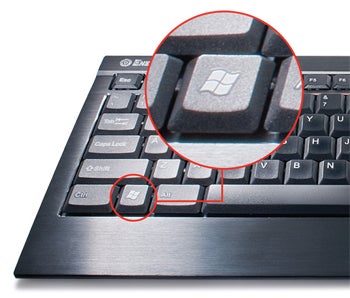
Work Your Windows Key


Lock your doors (and Windows): Stepping out for a minute? Remember to press Windows-L to lock your computer's screen so that no one can nose around without entering your account password.

Run, Windows, run: To access the Run command easily, press Windows-R.

Keyboard explorer: Want to open a new Windows Explorer window without leaving the keyboard? Press Windows-E.

Declutter your desktop: Access your desktop instantly by pressing Windows-D to hide all open windows. Press Windows-D again to return to where you were.
Read More

Thursday, December 10, 2009

10 Windows features I would like to see in Linux

This is a guest post from TechRepublic’s Jack Wallen and a follow-up to 10 Linux features Windows should have by default. For more posts like this see TechRepublic’s 10Things blog.

I recently shared my list of 10 Linux features I think should be included in Windows. Today, I’m going to challenge myself by finding 10 features in the Windows operating system that I would like to see make their way to Linux. I am not going to play the typical fanboy and make a joke of this by saying there is nothing in the Windows operating system that would be welcome in the other camp. We all know there are plenty of outstanding features in the Windows operating system. But I might stretch the nature of the word “features” to include a few items that are less inherent in the OS and more about the community or business model.

So with that said, let’s dive into this ocean and see what we catch.

1: Marketing
I have to start with the big guns. There may be only one IT-related business with a better marketing machine than Microsoft — Apple. But that’s a big “may be.” And everyone knows how small and inefficient the Linux marketing machine (or lack thereof) is. I feel fairly confident in saying that if the Linux operating system could enjoy the marketing that Windows enjoys, no other operating system would stand a chance.

2: Hardware support
I say this somewhat half-heartedly, because the hardware support Linux enjoys has come such a long, long way. But there are still areas where it could use a huge bump. Specifically, wireless. Most often a lack of a working wireless connection in Linux is due to having an unsupported chipset. And although the list of unsupported chipsets is getting smaller and smaller, it still exists. When potential new users come across an issue like this, they inevitably run back to Windows because they know their hardware will work. They may have to spend an hour (or a day) looking for drivers, but they know they can get it to work.

3: Smart phone syncing
Regardless of the type of smart phone you use, one of the biggest benefits of using it is that you can sync it with your PC. At least you can in Windows. Many smart phones quickly become slightly crippled when plugged into a Linux machine. Even my HTC Hero, which uses the Android operating system, can’t sync with Linux. Yes, you can add music to your Android phone. But try to sync contacts, calendars, or email with Evolution or KMail and you’re in for a never-ending nightmare. On the Windows operating system, this task is a complete no-brainer.

4: Enterprise presence
On so many levels, Linux is a perfect match for SMB and enterprise usage. Be it the desktop or the server, Linux could help improve the efficiency of workers. But that has not and could not happen without some real change. Exactly what that change is, I am not sure. But I do believe most of the change needed is on the end of the business — and we all know that is not going to happen. But if Linux could enjoy the presence that Windows has in the enterprise, the whole landscape of IT (from business to home use) would change.

5: Workgroup setup
I can get Samba set up pretty quickly, but that is after years of working with Linux. The average user would seriously be put to task to get this working. Joining a Windows machine to a workgroup is simple. Linux needs to gain this user-friendly ability to see and work with Windows machines with very little setup (and especially no editing of smb.conf).

6: Touchscreen
One of the big to-do’s with Windows 7 was the improved touchscreen support. Linux can work with a limited number of touchscreens (see #2), but to do so often requires the user to work with the xorg.conf file. And since X11 is now working with a xorg.conf-less setup, this is even more difficult. Although I’m not a fan, touchscreen could be the future of computing. It has worked majestically for the iPhone, so why not for the desktop PC? If that’s the case, Linux better get some Windows-like support worked into the picture.

7: Pre-installs
This could easily dethrone #1 from the top spot. A handful of companies (System76, for instance) offer pre-installed Linux solutions. If anything would give a better boost to Linux acceptance than pre-installs, I’d like to know what it is. Pre-installed operating systems are what gets the OS into the hands of the user. Sure, anyone can install an operating system if they want to (and have the IQ to do so - and we’re not looking at Sheldon Cooper levels of IQ), but this doesn’t happen on regular basis.

8: Support
This is a tough one. If you have a problem with Windows you can call Microsoft tech support (so long as you have the time). If you have a problem with Linux, who ya gonna call? You can call Canonical for Ubuntu support, if you’ve purchased a support package. You can call Novell for SuSE support, if you’ve purchased a support package. You can call Red Hat for Red Hat support, if you’ve purchased a support package. But what happens when you buy that shiny new computer, wipe off Windows, install Linux, and have a problem? Most likely, you’re going to hear that you have invalidated the warranty or support contract by doing so. PC makers need to learn to support the Linux operating system.

9: Software installation
I want to preface this by saying the Ubuntu Software Center will eventually negate this point. But for now, we’ll continue on as if USC doesn’t exist. To install an application on Windows, you simply download the installer and double-click the file. To install an application on Linux, you have to search for the application in a tool like Synaptic, mark it for installation, and apply the changes. After you click Apply, you have to hope that all dependencies have been met. And if you can’t find the software within Synaptic (or whichever tool you use), you have to add the repositories that house the software you need. I am a big fan of how Linux is evolving (thanks to tools like Synaptic and Ubuntu Software Center). New users expect to be able to download a single file and double-click it to install.

10: Direct X
One issue that keeps many features from migrating to Linux is Direct X. What would this do for Linux? In a word, games. Games are the reason so many people will not migrate to Linux. There are a lot of gamers out there, and until Direct X comes to Linux, those games will not find their way outside of any operating system that does not support Direct X.
Read More

Tuesday, December 08, 2009

Microsoft to Windows 2000 and XP SP 2 users: Next year, you're on your own

If you're one of the millions of XP SP 2 or Windows 2000 users who likes their old operating system just fine, thank you, be prepared to go it alone. As of July 13, 2010 Microsoft will end support for you.

The move is clearly part of the Microsoft strategy to kill XP (aka OSRD, the Operating System that Refuses to Die). XP has proven to be such a solid and stable operating system that millions of people have so far refused to upgrade to either Windows Vista or Windows 7, to the unending frustration of Microsoft.

Ending support for both XP SP 2 and Windows 2000 server and client next year may not have a significant effect on most users. When was the last time you actually got support from Microsoft, after all? And support will still continue for XP with later service packs installed --- extended support for XP SP3 ends in April, 2014 or two years after a release of XP SP 4, if such a thing ever happens.

The real key to the end of support isn't getting direct help from Microsoft; it's that when Microsoft ends support, it stops issuing security patches. That can prove to be problematic and put your PC at risk if you have an operating system that no longer gets support. So anyone with XP who wants to keep the old operating system should upgrade to SP3 by next July. That way, you'll still get patches.

If you've got XP SP2 or earlier, and want to upgrade to SP3, download it here.
Read More

Tuesday, December 01, 2009

Microsoft shifting internal focus to Windows 8 in July 2010


Ah, the tormented life of a Microsoft employee. You spend a few years of your life nurturing a product, teaching it some new tricks, and before you know it you have to release it into the wild and start all over again. Coincidentally, Microsoft also seems to do a lot of hiring during that tumultuous switchover period, and its latest round of job postings have offered a few clues as to what we can expect in Windows 8, and when the company plans to focus on it in earnest. That will apparently happen at the start of the company's 2011 fiscal year, which translates to July, 2010 for everyone else. As for Windows 8 itself, it seems that Microsoft is particularly interested in finding a few folks to work on how Windows Update works in the latest iteration of the OS, including things third-party application updating, updating virtual machines when they're turned off, and delivery of full applications -- Windows 8 Server and a "new UX framework" also garnered a brief mention. Hit up the link below for some additional details, and links to the actual postings if you happen to be looking for a job.
Read More

Thursday, November 26, 2009

10 Things Microsoft Can Do to Beat Chrome OS

Chrome OS might be the latest big thing in cloud computing, but that doesn't mean it can't be thwarted before it is released and has a chance to become a widely proven success in the industry. Google won't release a production version of Chrome OS for months. This gives Microsoft plenty of time to develop technological and market strategies to counter Chrome OS' competitive challenge. Here are some of the basic strategies Microsoft needs to follow.

Now that Google has shown its Chrome OS hand, it has made it abundantly clear what it plans to do with its online operating system over the next year. For many, those plans are exciting. Chrome OS promises to offer some of the most unique services of any operating system on the market. It could also rival existing leaders from Microsoft and Apple, as well as Linux OSes.

But there is a chance that Chrome OS could lose its ability to capture significant market share at the hands of Microsoft. The software giant that currently controls the operating system market can't possibly be expected to roll over and allow Google to be the only company offering an online OS. It also can't be expected to allow Google, its main nemesis online, to capture any of its market share. Realizing that, Microsoft is likely to have a plan to beat Chrome OS. Let's take a look at what Microsoft can do to beat Google's operating system.

1. Keep working on Windows 7

Windows 7 is a fine operating system that many folks are quite happy with. But it's the single OS that Google is targeting with Chrome OS. Microsoft needs to work hard to improve Windows 7 as Google prepares its online OS. It also needs to ensure that it attracts as many customers as possible. The happier the customers, the less likely they will be to move to Chrome OS.

2. Embrace the Web

At the same time, Microsoft should embrace the fact that future is on the Internet. Although Office is a promising next step for Microsoft online, it needs to work hard on Windows Azure. By doing so, it can cut Google off as it attempts to be the only company in the space doing something unique online. It will also divide the market into those who want Google's OS and those who want Microsoft's.

3. Point out Chrome OS shortcomings

There's nothing quite like explaining the shortcomings of a particular operating system to illustrate why your own operating system is ideal. The strategy works. Just look at Apple's "I'm a Mac, I'm a PC" ads for proof of that. If Microsoft wants to limit the impact Chrome OS will have on the market while working toward an eventual defeat of the online OS, it needs to start with some advertising.

4. Stay true to the enterprise

One of Chrome OS' major shortcomings is its lack of enterprise support. Say what you will about Windows, but the OS is perfect for the corporate world. If Microsoft wants to get in on the online-OS market, it needs to stay true to companies that don't want to be left behind. Google is leaving those companies behind. Microsoft can't.

5. Enhance Windows 7 Starter Edition

Chrome OS isn't necessarily a threat to any Windows 7 edition other than Starter. Realizing that, Microsoft should spend the next year improving Starter Edition to better compete against Chrome OS when it's released. Yes, that means adding back some of the (many) features users won't find in Microsoft's simplest operating system version.

6. Play even nicer with developers

One of the big factors that has yet to fully play out regarding Chrome OS is how software will be integrated into the operating system. For now, it features several Web apps that users can access, but what about more capable software that is slowly making its way online? If Microsoft really wants to beat Chrome OS, it needs to provide the platform that has what software users want. That can only happen through strong relationships with third-party developers. Microsoft needs to get to work on that immediately.

7. Work on multiple online properties

Another key component in Microsoft's strategy to beat Chrome OS must be the improvement of its other online properties. Bing is a great search engine with several neat features. Bing Maps is arguably better than Google Maps. Microsoft needs to continue improving its online services to attract more users from Google. That could help limit Chrome OS' impact online.

8. Use some cash

If Microsoft has anything, it has money—and lots of it. The company should use some of that financial muscle to develop an operating system superior to anything Google plans to do with Chrome OS. It could also use that cash to acquire some companies that would help in that endeavor.

9. Improve security

One of the main topics Google will touch on with Chrome OS is its security. Undoubtedly, the company will talk about why Chrome OS is more secure than Windows. Realizing that, Microsoft needs to work diligently to improve the security of its platform over the next year. If it can, Google won't be able to depend on making use of the security issue that has consistently haunted the software giant.

10. Prepare for the future with Windows 8

Finally, Microsoft needs to prepare for the future with Windows 8. Windows 7 might have only hit store shelves in October, but Chrome OS looks toward the future. Microsoft needs to plan for the future of computing that will be increasingly built on cloud computing and ensure that Windows 8 is closely aligned with this trend. At the same time, it needs to remember the customers, particularly in enterprises, who want to stick with conventional computing. If it does so, Microsoft will have the market covered. And that will only spell trouble for Google.
Read More

Wednesday, November 25, 2009

Why can't Google be more like Microsoft?

Jeff Haynie has a wish. He wishes that when building an operating system, Google was as open as Microsoft. Or at least as open as Apple.

He's well aware that Google likes to open source Android code. He realizes the company just freed code for an early version of its netbook-happy Chrome OS. And, yes, he heard über-Googler Sundar Pichai say that Google devs would work on the same Chrome OS code tree as developers outside the Mountain View Chocolate Factory.

But judging from the rather closed nature of the open source Android project, Haynie argues that Pichai's words were, shall we say, on the disingenuous side.

Haynie is the founder and CEO of Appcelerator, a Silicon Valley startup whose Titanium development platform is a kind of Chrome OS counter-play. The open source platform lets you build native mobile and desktop applications using web-happy development languages, including Javascript, Python, and Ruby on Rails. Google's Chrome OS, by contrast, is a web-happy operating system that doesn't run native applications. If you can call that an operating system.

But Haynie's Titanium builds apps for Google's other OS. It churns out native runtimes for Android as well as Microsoft Windows, Apple's iPhone, and the Mac OS - among others. Having dealt with all three tech titans, Haynie much prefers the open practices of Apple and Microsoft to the preternaturally closed setup at Google. Open sourcing aside.

Apple and Microsoft at least provide developers with a near final version of a new OS months before it reaches the rest of world, letting them test drive the platform under a non-disclosure agreement. Before the iPhone 3.0 arrived, Haynie had more than enough time to get his ducks in a row.

But Google plays a different game. It says it's open. But in reality, it completes a new OS entirely behind closed doors. Then it dumps the final version onto the web just days before it reaches the commercial market. Android 2.0 hit the web little more than a week before it turned up on Motorola Droid phones and Haynie's customers started complaining about broken applications.

Google hadn't even warned devs that a new version was on the way - unless you count a Youtube video of giant eclair.

"Google pushes big snapshots of code to the open source tree only at certain times," Haynie tells The Reg. "It's not like, say, Mozilla. Everything Mozilla does is in the open. It's never a big surprise, like 'Hey. Here's this new piece of code called Android 2.0'"

Yes, it's nice that Google open sources stuff. As Google will tell you, the company has opened up more than a million lines of code over the years. But that says only so much about its development practices.

When Google VP of product management Sundar Pichai says that Google coders will work on the same Chrome OS code tree as external devs, you can't help but think he's misleading the masses. Yes, we have a snapshot of Google's preliminary code. But between now and the OS's official release next year, you can bet the real development will happen inside the Chocolate Factory - until Google thinks the time is right to open source another snapshot.

After the first Chrome OS netbooks arrive next year, Google will no doubt open source revised code. But until then, the developer world is on the outside, trying desperately to look in.

That's the way with Android. Google codes behind closed doors. Then it open sources. Then it goes back behind closed doors and codes a new version. Google played the game with Android 1.0. And then 2.0 ('Eclair'). And you can expect the same from 3.0 ('Flan,' apparently).

Yes, this is Google's prerogative. But for developers like Jeff Haynie, it's a hassle. And it's indicative of a much larger irony. As Google paints itself as an open company merely interested in the good of users and developers everywhere, it provides preciously little insight into what it's actually up to, leaving devs to wonder what role they might play in something that's shaping up to be a vastly restructured computing paradigm.

But surely the answer is obvious: Developers have almost no place in Google's grand plan - unless they're developing for the web. But there are doubts for web devs as well. And with Google dictating hardware terms for the Chrome OS - not to mention the swirling rumors of a Google-branded Googlephone - even hardware developers can't be sure of their place in Google's world.

Chrome OS isn't built for developers. It's built for Google. And online advertisers.

Playing dumb

Sundar Pichai's bit about the Chrome OS code tree was only the second most disingenuous statement of the day. Asked if Chrome OS was Google's attempt to unseat Microsoft on the desktop, co-founder Sergey Brin played, yes, dumb. "Call us dumb businessmen," he said. "But we really focus on user needs rather than think about strategies relative to other companies and whatnot."

At least Apple and Microsoft admit they're Fortune 500 companies interested in making large amounts of money. At least Apple and MS developers know where they stand. Google won't even acknowledge it has a plan, much less tell you what that plan might be.

But make no mistake: The plan is to collect your data and serve you ads. It's no wonder Google is open sourcing its OS code. It doesn't sell software. And it never will. It's an advertising company merely interested in tracking what you do - and targeting your eyeballs accordingly.

That's why Chrome OS has shut out native applications - not to mention local data. Google talks of speed and security, and that's all well and good. But there are other paths to speed and security. Google wants to force you into using its very own web-based services/data-hoarding ad platforms.

Web-based developers have a place in this world. At least, that's what Google says. It's still unclear how third parties will compete with Googly services. But even if Chrome OS is wonderfully open to third-party web devs, this leaves out far more than just Microsoft - Google's bete noir. If it can't run native applications, it can't run Skype. It can't run all sorts of media players and IM clients. And the list goes on.

Yes, Google provides for native applications on Android. But Android's closed open source model has its own drawbacks. And with handset makers free to reuse the code however they want, market fragmentation is inevitable. Google plays down talk of market fragmentation, but in the end, fragmentation doesn't matter to Google. It's even a good thing.

Once again: Google wants you on the web - not on local applications. Sergey Brin says that one day Chrome OS and Android will merge, and we can only assume they will merge in a way that freezes out local apps entirely.

If you believe the rumors, Google may even shun its own hardware partners in its ongoing quest for ad dollars. After a widely ridiculed claim from TechCrunch that Mountain View is developing its very own Googlephone, The Times (of London) has served up a story saying much the same thing.

According to The Times, this alleged VoIP phone will use a new version of Android dubbed Flan. In case you're slow: Flan is not open source. Google won't even say if it exists.

A representative of HTC - the Taiwanese handset manufacturer - tells Appcelerator's Jeff Haynie that it has 150 engineers working inside the Mountain View Chocolate Factory. They may or may not be working on the Googlephone. But it wouldn't surprise us if they are.

With Chrome OS, Google has shown it wants control of the hardware as well as the operating system. It'll open source the alleged Flan - after leaking a video of a giant dessert onto YouTube - but don't let that fool you into thinking Google will have anything less than complete control of the entire device. If you can call it a device. It's really just an ad platform.
Read More

Monday, November 23, 2009

Chrome OS And The Microsoft Squeeze

Now that we’ve all actually seen Chrome OS, the immediate reaction that most are jumping to is that it won’t be killing Windows anytime soon. Obviously. But that doesn’t mean it won’t hurt Microsoft, and apply long-term pressure to the dominant OS. In fact, Google’s positioning for Chrome OS reads like a page out of Apple’s playbook, only from the opposite direction.

Google is aiming Chrome OS right at the bottom of the market. That is to say, cheap computers, netbooks. Apple, of course, takes the opposite approach, targeting the high end of the market with their high-quality and high-margin machines. If Google is successful with its Chrome OS netbooks (let’s call them ChromeBooks), what we could see is the squeezing of Microsoft, an idea I first laid out a month ago. With attacks from the top and bottom, Windows will be relegated to the middle. And ultimately, if Google has its way, marginalized.

There are a number of problems with being in the middle. First and foremost, the middle is average, boring, bland, etc. There’s nothing particularly wrong with that, unless you’re a company like Microsoft with an image problem. After years of taking hits, Microsoft is trying to revamp its image with expensive ads, new stores, and a new OS, among other things. But the middle is hard to sell. It’s neither the cheapest nor the best. It’s the thing people have to settle on.

Microsoft, of course, is also in the netbook space with Windows XP and now Windows 7. But after being a sector on fire for much of the year, signs point to a slowdown in sales. While you might think that would be bad news for both Microsoft and Google, Google’s ChromeBooks are really a new category altogether. As Google said during its event, they’re working with specific hardware manufacturers to make machines set to a certain standard. This means that they’ll have larger keyboards and trackpads than most netbooks, among other things. In other words, they’ll be better, from a hardware perspective, than most netbooks.

And they potentially serve a different purpose. A couple days ago, Daring Fireball wondered if the real key for Chrome OS (and netbooks) may be to serve as your secondary computer. But there’s really no need to wonder, Google’s VP of Product Management, Sundar Pichai, said as much during the Q&A session. “This will be a secondary device. It may be a primary device in terms of time spent on it, but we expect people to have other computers too,” he said when asked about more powerful editing software not being able to run on Chrome OS.

People aren’t buying $300 computers with the expectation of running Photoshop (which costs $700) on them. They are buying them mainly to get an extremely portable machine that can surf the web. Google’s promise with Chrome OS is the fastest way to do that.

And that’s what a lot of critics are missing (but we’ve been saying since July). Google isn’t trying to compete with a standard OS, they’re trying to help users realize that for the majority of computing they do, they don’t need one in the first place. Maybe you have a desktop computer at home for those few tasks that need dedicated native applications, and maybe that runs Windows or maybe that runs OS X. But maybe the machine that you use most of the time is your cheap, fast ChromeBook.

Though they get criticized a lot for not making a netbook, Apple also competes in this highly mobile space — their “netbook” is the iPhone. While unlike Chrome OS, the iPhone can run native applications, it speaks to a similar point: Increasingly, for most of your computing, you don’t need Windows.

The point is that consumer computing is shifting to a place where speed and mobility are paramount. The reason people are so excited about products like the CrunchPad and Apple’s tablet isn’t because they can run Photoshop — they can’t — it’s because they offer an easy way to use the Internet. Same thing with the iPhone. Same thing with Android phones. And it will be the same thing with Chrome OS and the ChromeBooks.

The difference is that these ChromeBooks will be the first devices that actually look like the traditional computers we’re used to. They will look like they could be Windows machines, but they won’t be. That’s a powerful stereotype to break. And if Google breaks that at the bottom of the market, with Apple continuing to break it at the top of the market, Microsoft will begin to feel squeezed.
Read More

Friday, November 20, 2009

Sinofsky's Windows plan: More data, less testosterone

While some have criticized Steven Sinofsky for being tight-lipped, the Windows boss insists that he is being prudent, not secretive.

"Everybody wants to know what's coming and what's next." But, he said, talking too soon, too early is actually a bad thing that just leads to frustration.

"You reacting to some nightly developer build isn't really productive to anybody," Sinofsky said in an interview at this week's Professional Developers Conference.

Sinofsky says that people don't want to show up to a restaurant and watch a potato being peeled and taste it half-cooked. For the same reason, he prefers to not talk about things until they are well, fully baked.

"It's hard to imagine what else you want to see while it's in progress," Sinofsky said. "I don't want to see the daily cuts of a movie. I want to see what the director thought at the end."

As a result, Microsoft didn't show Windows 7 until last year's Professional Developers Conference, just a year before the product was released. That's in sharp contrast to the prior version of Windows, which was first shown as Longhorn back in 2003. It ultimately suffered through numerous delays and significant changes before being released as Vista.

From early indications, Sinofsky would appear to be on to something. While Vista was largely panned by critics and shunned by businesses, Windows 7 has thus far had strong early sales and gotten high marks from reviewers.

It's some of the same philosophy Sinofsky took in his earlier days, when he led development of Microsoft's Office franchise.

"Normal people have stuff to do," he said.

That's also why he doesn't really look for public feedback until the software is largely done.

"We don't want feedback on a screenshot," he said.

Sinofsky shifted from Office to Windows in March 2006 and earlier this year added responsibility for the business side of Windows as well, becoming the unit's president.

He said his philosophy toward Windows really boils down to a single word--responsibility. "There's not another project in software to work on that a billion people use and we take that really, really seriously in the hallways of our dev team," he said.

Sinofsky also isn't one to be swayed by emotional arguments for or against a feature. If you want his attention--show him the numbers. He said he wants feedback, but he wants that feedback to "be based on data and not assertions or opinions or anecdotes."

During his PDC talk on Wednesday, he referred to the other approach as "testosterone-based engineering."

"It turns out we did a lot of things by that method," Sinofsky said. Often times, decisions on which features to include in the next version of a product were made that way. People, Sinofsky said, would basically just ask their friends.

"Let me get this straight," Sinofsky said. "You are going to ask your 10 friends who all go to Fry's and build their own gaming machines and that's going to be the way we decide which features go in the product?"

That, he said, "seems a little homogeneous. It seems a little limited in its reliability."

But these days, Microsoft has a better option, gathering lots and lots of data from real-world use. Quite often, he said, the data will show things that might not be intuitive to Redmond's engineers.

As an example, he showed a graph at the conference that showed the huge variety of graphics resolutions that Windows users were operating at, including a significant number with VGA-resolution displays. Folks in Redmond initially assumed they didn't really need to worry about such low-resolution screens.

True to form, Sinofsky was emphatically silent when my questions drifted toward the future. I asked whether we might see a beta of Internet Explorer 9 at Mix and he literally just sat there silent until I asked the next question.

Later on in the interview, the mere mention of Windows 8 got the same stone-faced glare.

"I won't ask you what's in Windows 8, but can you talk at all (about it)? You mentioned that you are a few weeks into designing IE 9," I said. "Are you a similar amount into Windows 8?"

Silence. More silence.

"I didn't say any of the words--Windows 8--those were all your words," he said. "Next."

Sinofsky did have some interesting things to say when I asked for his take on competitors like Google and Apple.

"You have to take it very seriously," he said of the competitors. "That's always, always true in the software world. In the software world it doesn't take a lot to have a dramatic shift in how people perceive you or how they act. It's just very important no matter what your perceived or real or measured share is at one moment, it doesn't take a lot to change it down the road."
Read More

Tuesday, November 17, 2009

64-bit Windows safer, claims Microsoft

But lower infection rates for 64-bit won't stand, counters researcher

Windows users running 64-bit versions of the operating system are less likely to get infected by attack code, Microsoft's security team said yesterday.

But that doesn't mean they won't, countered an outside security researcher.

"64-bit Windows has some of the lowest reported malware infection rates in the first half of 2009," said Joe Faulhaber of the Microsoft Malware Protection Center in a post to the group's blog yesterday. "64-bit malware is still exceedingly rare in the wild."

Faulhaber cited statistics gleaned from Microsoft's Malicious Software Removal Tool (MSRC), a free malware detection and deletion utility the company updates and pushes to users monthly. According to Microsoft's data, the 64-bit version of Windows XP was 48% less likely to be infected than the 32-bit edition during the first half of 2009; PCs running Vista 64-bit, meanwhile, were 35% less likely to be infected than Vista 32-bit.

Windows 7, which was not included in the data for the first half of this year because it had not been released in final form, also is available in both 32- and 64-bit editions. Faulhaber noted that Windows 7 64-bit is the dominant flavor of that new OS as he touted its security. "Most PCs shipping with Windows 7 come with the 64-bit versions of Windows," he observed.

Windows 64-bit is safer to run, he argued, in large part because malware, which is written for the much more widely used 32-bit versions of Windows, is "confused by 64-bit."

That's not necessarily true, said Alfred Huger, formerly with Symantec and currently vice president of engineering at security start-up Immunet. "There's a lot of 64-bit malware," said Huger. "They can run their code in compatibility mode, or they can compile it for 64-bit. The reason they're not is that there's still not a lot of 64-bit deployment. There's 64-bit malware out there, just like there's Mac OS malware out there. But right now, [64-bit] is just not as opportune a target as 32-bit."

It's relatively simple for criminals to customize their attacks against 64-bit systems, Huger maintained. "We almost never see just one [piece of malware] on a machine. It's almost always eight or ten or a dozen," he said. "Most malware gets on your system because you put it there, and one of the things most attacks do is download a bootstrapper that then downloads other malware. It's easy for attackers to have their bootstrapper check whether the OS is 64-bit, then grab 64-bit malware to download onto the PC."

In the end, said Huger, there just isn't a "compelling reason" for hackers to bother with 64-bit, but there's nothing inherently more secure about a 64-bit operating system. "Malware is just software," he observed. "It can execute on 64-bit just like other software."

Faulhaber argued that 64-bit Windows was safer by design than the less-powerful 32-bit version, ticking off such measures as PatchGuard, which makes it more difficult for malware to tamper with the operating system's kernel. PatchGuard is included in the 64-bit versions of XP, Vista and Windows 7. He also mentioned WOW64 (Windows On Windows 64), the lightweight emulation mode that lets 64-bit versions run 32-bit code. "The additional protections built into 64-bit Windows will make it harder for malware to make the 64-bit jump," Faulhaber said.

While Faulhaber trumpeted 64-bit XP's and Vista's -- and by extension, Windows 7's -- ability to sidestep more malware, the bi-annual Microsoft Security Intelligence Report he cited said that some of the lower infection rates might have nothing to do with the OS, and everything to do with the user.

"Infection rates for the 64-bit versions of Windows XP and Windows Vista are lower than for the corresponding 32-bit versions of those platforms, a difference that might be attributable to a higher level of technical expertise on the part of people who run 64-bit operating systems," the report concluded. "This difference may be expected to decrease as 64-bit computing continues to make inroads among mainstream users."

Nor did Faulhaber go so far as to claim that 64-bit Windows, even Windows 7, was stout enough to do without security software. "64-bit Windows needs 64-bit anti-malware software like Microsoft Security Essentials to protect the whole computer," he acknowledged, touting his company's free security suite, which shipped in late September.
Read More