Showing posts with label Windows 7. Show all posts

Saturday, February 13, 2010

7 reasons to move on from ageing, tired Windows XP

There is no doubt that Adrian Kingsley-Hughes has passion for what he does, and his latest post in regards to sticking with Windows XP certainly made me chuckle. But we have to face facts that Windows XP is now in excess of nine years old, and should have ran past its self-by-date


Stick with what you know It’s old and tired

That dazzling blue interface was revolutionary for Microsoft and incredibly bold of the company to go so bright and cheerful, almost. But with the temptation of “floating” glass windows, transparency and clarity in the newer versions of Windows, you barely need to learn anything new.

You should just be able to start Vista or 7 for the first time and be guided through everything, and comfortable enough using your prior knowledge to get everything out of it that you had with XP.


Certainty New and improved certainty

Windows 7 packs more drivers in and even Ubuntu has started supporting incredibly powerful hardware, should drivers be written by a community member or the manufacturer.

Newer graphics cards especially, along with sound cards and other multimedia devices will work with Windows XP still, but they also support Windows Vista/7; with DirectX being far more powerful than ever before, surely you’d want to take advantage of that?

Cost Go open source instead?

They said Windows XP was expensive at the time, but for what it was giving you in line with the global economy, it wasn’t bad at all. Vista of course looked bad in terms of cost and Windows 7 is cheaper than ever. But as I’ve said, Ubuntu 9.10 is incredibly fast, reliable and works in line with how you’ve learned to use computers. So why not go whole hog and go open-source to a newer, better operating system instead?

It’s still supported by Microsoft …but not for long

Yes, XP is still supported until 2014 but only because it has been, granted, rather popular. But if you are ready to get a new computer, whether it be a laptop or a fully-fledged desktop computer with all singing and dancing bells on, don’t stick with XP.

Plus, you can’t even buy Windows XP anymore off the shelf, and if you’re unlucky enough to have it bundled with your new computer, then surely something doesn’t strike right with the OEM. You and the manufacturers should be aiming for future-proofing, not sticking with relics from the old decade.

Developers still support XP Developers are going next-gen

Developers have been aiming forwards for a while now, by taking advantage of new technologies in-built into the latest operating systems. You wouldn’t have TPM management on a Windows XP machine, so why not upgrade and get the best security features available (or rather was, had it not been recently hacked)?


So developers, and therefore you who use the software that they build, should be using these new features, whether it’s the latest .NET Framework or the Compiz/DWM software that makes Windows and Ubuntu look glossy and lovely. Plus, x64 Windows XP isn’t too easy to get hold of nowadays without an MSDN or TechNet subscription, whereas Windows Vista/7 and x64 editions of Linux are relatively easy.

Upgrade components to stay secure Or more overall security

I’m not here to debate whether Vista/7 is more secure than any other operating system in the world, because let’s be honest now, if you’re behind a server than your client is only as secure as your infrastructure. Even with all the patches, the hotfixes and the service packs, future operating systems will have better suited under-the-cover technologies which can prevent malware.

UAC - love it or hate it - there’s no doubt it must have helped someone out there. And failing that argument, Linux users are a far lesser risk of attack so upgrade to something open-source and shiny.

Do you really need to upgrade? No, but you should!

Let’s face it. Would you rather be living in the past or gazing ahead at the future? I’ve always been one to play with the pre-release stuff and look ahead at what’s next. Those with student email accounts may as well jump on board and take solace in knowing you’ll get a far cheaper deal if you upgrade to Windows 7, and as I’ve said before, Ubuntu is a worthy adversary if you choose the non-Windows route.

Windows XP was good for its time, but I like to think, at least hope, that we’ve moved on since 2001.
Read More

Thursday, February 11, 2010

Microsoft plans antipiracy update for Windows 7


An optional update to Windows closes a number of hacks that counterfeiters have used to bypass the product activation technologies built into Windows 7. With the update, Windows will try to restore Windows to its proper state, as well as marking tampered versions as non-genuine copies of the operating system.

Microsoft said on Thursday that it is planning an update to Windows 7 that will close a number of loopholes that counterfeiters had used to thwart the operating system's built-in antipiracy measures.

The Windows Activation Technologies Update for Windows 7, which will be released later this month, closes more than 70 "activation hacks," according to Joe Williams, general manager of Microsoft's Genuine Windows unit, responsible for anti-counterfeiting measures. The update will also check with a server periodically to see if there are further hacks that need to be addressed, though Williams said no personally identifiable information about the user will be sent to the server.

In an interview, Williams cautioned about the dangers that come with using nongenuine versions of the operating system, citing a German study that looked at several hundred copies of Windows 7 that were posted online and found that nearly a third had some type of malware.

"We do see malicious code--everything from easily discoverable malware to keyboard recording," he said. "There's all sorts of things we've seen that puts our customers at risk and their data at risk."

The update will be available for manual download from Microsoft's genuine Web site on Feb. 16 and from the Microsoft Download center the following day. Later this month, the update will also be offered through Windows Update as an "important" (but optional) update.

Williams said the new update will remain optional and that those who choose not to install it will still be able to get other Windows updates, a position that marks a fairly sharp contrast to the once hard line Microsoft was taking against piracy.

With the first release of Windows Vista, Microsoft took an aggressive stance, shifting users it determined to have nongenuine versions of the operating system into a severely limited "reduced functionality" mode. In that mode, all users could do was access the Internet for an hour a day.

However, Williams said that Microsoft heard from customers, businesses, and governments that the restrictions were to draconian and decided to try a different approach.

In the first update to Vista, Microsoft relaxed things considerably, choosing instead to just prominently notify users that their version was not genuine.

Starting with Vista Service Pack 1, users saw their background changed to black and a message that their version was nongenuine, as well as getting a dialog box encouraging them to activate a genuine copy. One could choose to do so immediately, or, after 15 seconds, could click an option to activate later.

With Windows 7, Microsoft eased things even more, allowing users to immediately choose to deal with the issue later, although those that choose that option are notified of some of the benefits of genuine software.

Williams declined to say whether Microsoft will close any of the activation hacks with the first service pack to Windows 7, noting that the company has not yet confirmed any plans for that update. Microsoft did close a number of activation holes in Vista with the service pack to that product.

Williams said Microsoft has put much of its focused on informing customers that may have been duped into buying a PC with non-genuine software.

"We are pretty realistic," Williams said. "People who are actively pirating will try to find ways to continue to pirate."
Read More

Wednesday, February 10, 2010

7 reasons to stick with Windows XP

Last week a reader challenged me to come up with 7 valid (-ish!) reasons for users to stick with Windows XP rather than upgrading to Windows 7.
Here you go!

  • Stick with what you know
    Every new OS comes with a learning curve. Sometimes that curve is gentle, sometimes it’s steep. By sticking with what you already know, you’re bypassing the whole learning curve thing altogether!
  • Certainty
    Installing a new OS is a leap into the unknown as far as hardware and software compatibility goes. If you do your research you can reduce on these unknowns, but you can never truly eliminate them. Even with the best research and testing, it’s possible that something in your hardware and software ecosystem won’t take kindly to the upgrade.
  • Cost
    While many people like to cling on to the belief that upgrading operating systems will save them money, in the real world this is rarely the case. Not only will the OS upgrade itself set you back a fair few dollars per system, but you then need to factor in other expenses (basically, replacements for anything that ends up not working because of the upgrade).
  • XP is still supported by Microsoft
    Microsoft will continue to offer what it calls extended support for Windows XP (running the latest Service Pack) up until April 2014. This means that you will still be able to get security updates for the operating system for years to come.
  • Developers still support XP
    Software developers still support XP, which means you can still find and get updates for software you run on your XP system. Remember, the OS is just a platform for other software.
  • Upgrade components to stay secure!
    Rather than upgrading your entire operating system in the hope that you’ll be more secure, upgrade old and obsolete software you have installed on your OS instead.
    Secunia PSI is a great piece of kit for ferreting out vulnerable software that’s buried on your systems.
  • Do you really need to upgrade?
    Think about it. What are you really missing by not upgrading? Again, while the sales literature for Windows 7 looks good, you need to think about how those new features will translate into value for money on the ground.

See, that was easy!

Just to be clear, I could come up with 7 reasons to stick with Vista or upgrade to Windows7 too … :)
Read More

Monday, February 08, 2010

Windows 7 stability update makes PCs unstable, users report

Microsoft says not a 'major issue,' sees no evidence Jan. 25 patch at fault

Some Windows 7 users have reported that their PCs started to freeze or randomly display the infamous "Blue screen of death" after applying a January update Microsoft billed as a stability and reliability fix.

Microsoft today said it doesn't consider the problem a "major issue," but acknowledged it's investigating.

As first noticed by Ars Technica, a short thread on Microsoft's Windows 7 support forum discusses the update, which Microsoft issued two weeks ago, on Jan. 25.

The update is designed for both the 32- and 64-bit versions of Windows 7, as well as Windows Server 2008 R2.

"I just installed this update and my system hangs/freeze[es] at the Windows bootup screen," said a user identified as "Kamonk2" on the support thread Jan. 27.

"I had the same issue on my brand new laptop," echoed "MacPCGraphics" on Jan. 29. "It worked fine until the Auto Update kicked in and installed an update. Started hanging and freezing after that."

Another user offered an even more detailed description of the update's impact.

"Windows Update installs the KB977074 update but after rebooting, my system hangs. To be more specific, the computer boots up and begins to start Win7...I then get a message to say that 'Windows is installing updates...Do not turn off your computer...0 (zero) %,'" said "dunghoaxinh" on Jan. 30. "Unfortunately, it just stays on '0%' and the system seems to hang here. The only way to get around this is by cold reboot and system restore to before the update."

Several of the users affected by the update reported that they regained control of the machine by uninstalling the Jan. 25 stability and reliability update. "I also removed KB977074, which fixed my problems," said "bob_az" on the thread a week ago.

A Microsoft-employed forum moderator had other advice. "For the people who installed [the update but] cannot start the computer normally, it is better to wait for the next stability and reliability update," said Arthur Li on Feb. 1. "Since there are thousands of different hardware and software configurations, it is hard for Microsoft to test the updates on all the different hardware and software configurations."

Today, Microsoft downplayed the problem and denied that there's any evidence the Jan. 25 update is ot blame. "We have not seen customer problems with KB977074 as a major issue within our customer support channels," a company spokeswoman said in an e-mail. "We are aware that some customers are having issues and are working to identify the cause. At this point, there is no indication that this specific update is the cause of install, stability or reliability issues with Windows 7."

Windows upgrades and updates occasionally run amok. Last fall, for example, Microsoft's support forum lit up with complaints from customers whose machines were trapped in endless reboots after an attempt to upgrade from Windows Vista to the then-brand-new Windows 7.
Read More

Microsoft: Windows 7 isn't trashing your battery

Last week I posted on how there’s was a growing believe that a flaw in Windows 7 was causing Windows 7 to permanently trash notebook batteries. Today, Microsoft’s president of Windows and Windows Live division Steven Sinofsky responds.

Sinofsky has posted an extensive response to the issue on the Engineering Windows 7 blog, but I’ll extract the highlights for you here:

  • We have seen no reproducible reports of this notification on new hardware or newly purchased PCs. While we’ve seen the reports of new PCs receiving this notification, in all cases we have established that the battery was in a degraded state.
  • Our OEM partners have utilized their telemetry (call center, support forums, etc.) and have let us know that they are seeing no activity beyond what they expect. It is worth noting that PC manufacturers work through battery issues with customers and have a clear view of what is to be expected both in general and with respect to specific models, timelines, and batteries.
  • In our telemetry from RTM code customers, only a very small percentage of users are receiving the “Consider replacing your battery” notification, and as expected, we are seeing systems older than ~1.5 years. We’re seeing relatively fewer notifications compared to pre-release software as the average age of the system decreases.
  • Microsoft has received 12 customer service incidents in addition to pulling 8 additional incidents from various forums. To date (for a total of 20 incidents), none of these have shown anything other than degraded batteries.

Over the past few days I’ve been getting feedback from some users convinced that their battery took a hit after installing Windows 7. That said, follow-up questions seem to highlight several factor that might contribute to the problem:

  • Old batteries (+2 years old)
  • Third-party batteries
  • Third party chargers

At the moment, I feel that the problem here has more to do with people being told that there’s an issue. Once people get a little information (especially bad news), they begin to obsess over it (whether that be SMART info relating to hard drives, CPU or GPU temperatures, or battery state), so I’m tempted to say that this is what’s we’re seeing here.
Read More

YouGov: Microsoft outpaces Apple in customer satisfaction ?

It seems that Windows 7 gave Microsoft a much needed customer satisfaction boost.

According to research carried out by YouGov, the number of respondents giving Microsoft a positive grade for customer satisfaction jumped to 67% in the week following the launch of Windows 7 (October 22, 2009), up from 64% where it stood the day before the OS hit the shelves. By December 31, Microsoft’s satisfied customer percentage jumped to 73%, the highest rating Microsoft has had since YouGov began the survey in 2007.

Compare this to Apple. When Snow Leopard was released (August 28, 2009), the new OS boosted the number of satisfied customers by only 1%, to 65%.

Impressive gains for Microsoft, but what will be even more impressive is if the company can hold onto these gain over the coming year.
Read More

Early Windows 7 Testers Must Soon Upgrade or Backtrack

The unprecedented number of PC users who installed Windows 7 release candidate (RC) will soon have to decide whether to upgrade to the new OS or face bi-hourly shutdowns and significant hassle re-installing their old version.

Beginning on February 15, users of machines running the RC will see an expiration message above the taskbar, followed on March 1 by the start of shutdowns every two hours. The next key date will be June 1, the point at which the entire desktop wallpaper will be replaced with the message "This copy of Windows is not genuine", a state that will nix updates of any kind and the ability to use Microsoft applications.

"To avoid any data loss, I suggest making plans to move to a released version of Windows 7 before the automatic shutdowns start. During these shutdowns, your work will not be saved," says Microsoft's Brandon LeBlanc in blog reminding the world of the issue.

At this point RC users have only two options if they want to continue using their computers; to upgrade to Windows 7 through a full install, or revert to a previous operating system such as Vista. How easy that the latter choice proves will depend on the way the OS was installed, the size of the hard disk, and the technical expertise and patience of the user.

Anyone who installed the RC over Vista or XP should be able to return to that version as long as their PC contains the folder Windows.old and the available hard disk space is double that consumed by this folder.

However, as an article on the topic makes clear, even then the re-install of Vista or XP could turn into a time-consuming process unless the user is willing to start from scratch and has the required OS disks to hand.

The message from Microsoft is clear: let go of the past and pay to upgrade to Windows 7.
Read More

Friday, February 05, 2010

Windows 7 Battery Update: Still No Conclusive Findings

Microsoft and its PC maker partners are continuing to look into battery problems which some Windows 7 users have said they’ve been experiencing. So far, there’s nothing new to report, Microsoft officials said on Friday, February 5, but their investigation is continuing.

It’s still unclear exactly what is going on — whether there’s a problem with the PC batteries themselves or there is something that could be fixed via a software update/patch. Reports about what’s happening are all over the map: Some are claiming they are getting less battery life with Windows 7 than Vista or XP. Others are saying they are getting false reports that their batteries are faulty. There are a variety of battery-related complaints, some dating back to before the final release of Windows 7, in the Microsoft TechNet forums.

Given the relatively small number of reports of problems (seeing that Microsoft has sold 60 million copies of Windows 7 to date), is this just a case of normal hardware failure? From the TechNet forums, problems seem to be occurring across a variety of vendors’ systems, and aren’t just isolated to a single type of PC.

One source I spoke with this week, who asked not to be identified, threw cold water on the idea that Windows 7 itself could be destroying PC batteries.”There’s no way a Windows 7 interaction with the BIOS would cause any temporary or permanent battery damage,” the source said.

One of Microsoft’s Gold reseller partners told me he received a puzzling response when he contacted HP about 30 HP NC6400 laptops, purchased two years ago, which are experiencing battery-related issues.

“I escalated this with HP this past week and they were ignorant of the issue (still waiting for resolution and callbacks),” said Scott Hill, CIO of RightSize IT. “One recommendation was to roll back to Vista (never again), another was to roll back a laptop to XP to verify if the battery was good (loss of productivity), and the final one was to replace all my laptops with a Win 7 compatible laptop (over a $60,000 investment).

There’s no one “throat to choke,” Hill said. If this is a driver problem, is it a Microsoft issue or an HP one?

“HP states that the drivers (Advanced Configuration and Power Interface, or ACPI) are Microsoft supplied so they are pointing to them, ” Hill said. “Further, I noticed in the Device Manager that I have one Unknown Driver – “ACPI\HPQ0004”. What drives me nuts is that this has occurred across all platforms at the same time – what is the possibility that 30 LION batteries in 30 laptops having the same condition? The only consistent variable is the ACPI drivers from Microsoft.”

Hill continued: “We show 100% charge using the ‘Balanced Power Plan’ and after about 10 minutes it reaches 92% then falls to 7% in less than a minute and shuts down the laptops – when previously with XP we were getting three to four hours per charge. What’s worse, is that we lost the utilities we used to have to calibrate and discharge the batteries to avoid battery memory issues. I think there is a bug in the ACPI in cycling the batteries through the charging, etc.”

If others have reported problems to Microsoft or their PC providers and have open helpdesk tickets, I’d be interested to hear what you’re hearing back….
Read More

Wednesday, February 03, 2010

Will your new Windows 7 PC support XP Mode?

Last May, a few months before Windows 7 was released to manufacturing, I looked at the then-current crop of CPUs available for business PC buyers and identified a potential sticking point: Some of the most popular Intel CPUs available at the time didn’t support hardware-assisted virtualization (HAV). That made them incompatible with the newly announced Windows Virtual PC and Windows XP Mode, a crucial compatibility feature in Windows 7.

The problem is that Windows Virtual PC requires hardware-assisted virtualization (Intel VT for Intel CPUs, AMD-V for AMD processors). And the late-2008/early-2009 CPU lineup from Intel was notoriously inconsistent in its support for VT.

So, is that issue still a sticking point for corporate customers considering a Windows 7 upgrade in 2010? My quick survey of the current PC market says you’re much less likely to run into virtualization problems today, but at most online shopping sites you’ll have a hard time finding details about virtualization support for specific models. Here’s a recap:

Dell’s lineup of Intel-powered business PCs specifically identifies them as being VT-capable. The budget Vostro line, for example, includes the latest versions of Intel’s E5400, E7500, and Q8200. On Dell’s website, the specs explicitly list VT support for all of those CPUs.

Likewise, Dell’s low-end Vostro notebooks (with starting prices of $649 or less) include SU3500 and SU7300 processors, both of which include VT support. The lowest of the low-end Vostro notebooks includes a Celeron M 743 processor, which lacks VT support. But it’s sold with Ubuntu Linux, not with Windows.

In the higher-end lines, Dell has the AMD-powered OptiPlex 740, which doesn’t require any research. All modern AMD CPUs with the exception of the very-low-end Sempron line support hardware-assisted virtualization. The Intel-powered OptiPlex series also supports VT in all models except those powered by ancient Celeron CPUs–and those models come with Windows Vista Home Basic, not Windows 7. Dell’s website makes it clear when an OptiPlex model includes VT support

Over at HP’s business site, it wasn’t so easy to tell whether a specific model supports VT. The lowest-end Compaq desktop machines on HP’s website all include Intel Pentium processors in the E5000 and E6000 series. If you get an E6300 CPU, you’re good to go, as all Intel parts with that label support VT. The E5300 is more problematic, however, because Intel redesigned it last year to add VT support. Some E5300s support HAV, others don’t. Caveat emptor.

Among HP’s notebooks, it was equally difficult to tell which models support HAV. The low-end Compaq models don’t offer any clue in the specs. Even the HP Notebook Finder, which lists 77 different models, doesn’t offer any way to filter buying choices by virtualization support.

Sony’s website pointed me to VAIO Y series when I asked for business notebooks, but even though that series includes the option for Windows 7 Professional there’s no mention of VT support. The specs tell me it uses an SU7300 CPU, which does indeed support VT

Likewise, Toshiba’s website offers a plethora of models, but when I searched for VT and virtualization I got no results back. And in the specifications for individual models, there was no mention of those topics. A Toshiba support article entitled “Using Virtualization Technology” (PDF) sounded promising but was ultimately disappointing, offering this unhelpful text: “If your BIOS does not provide virtualization technology as an option, this feature is not supported on your computer model.”

So what’s a business buyer to do?

For starters, I recommend that you make HAV a checklist item on new PC purchases. At every price point, I found choices that include VT support among notebooks and desktop PCs. Unless you’re absolutely certain you will never need it, this should be a must-have item.

If you’re shopping with Dell, this information is easy to find, and they deserve credit for that transparency. If you can’t confirm from published specs that a specific model supports virtualization from your preferred vendor, ask. Get written assurance from the PC supplier that the model you’re purchasing includes support for HAV, not just in the CPU but in the BIOS.
Read More

Monday, February 01, 2010

Windows 7 adoption swells, as XP suffers record drop

Mobile operating systems make more gains, Mac OS X up slightly

Microsoft's Windows 7 took just three months to reach a penetration benchmark that Vista needed almost a year to make, Web measurement firm NetApplications.com said today.

Windows 7 finished January with a 7.5% usage share, a mark the little-loved Windows Vista didn't attain until 11 months after its January 2007 debut.

"There's no slowing of the Windows 7 growth curve," said Vince Vizzaccaro, executive vice president with Net Applications, who also noted that on Sunday Microsoft's newest OS accounted for more than 10% of all machines that were online. Windows 7's share typically climbs on weekends and holidays, as more of the people online are running home computers, which are more likely to run the new operating system.

During January, Windows 7's weekly averages increased steadily from 7.2% to 7.4%, then to 7.6% and finally to 8% in the final week. For the month, Windows 7 was up 1.8 percentage points, its second-biggest one-month increase.

As in recent months, both Windows XP and Windows Vista lost share in January as Windows 7 gained ground. Windows XP slid to 66.3%, down 1.46 percentage points, a new single-month record that erased the 1.43-point decline of November 2009. Vista, meanwhile, lost 0.5 of a percentage point to end at 17.4%. Vista has now lost usage share three months in a row, and in four of the last five months, solidifying the trend that points to a permanent decline as users abandon it for Windows 7.

If the trends of the last three months persist, Windows 7 will overtake Vista as the second-most popular operating system -- and grab the No. 2 spot behind XP -- in June.

This isn't the first time that NetApplications has compared the uptake of Windows 7 with its predecessor. Last November, Vizzaccaro noted that Windows 7 had reached a 4% share in just three weeks, a mark Vista needed five months to hit.

The bulk of Windows 7's gains have come at XP's expense, not surprising since the eight-year-old-and-counting OS is the most popular on the planet by a huge margin. Since Windows 7's late October 2009 debut, Windows XP's share has dropped nearly three times more than Vista's.

Apple's Mac OS X climbed slightly last month, finishing December with a 5.13% share after an increase of just 0.02 of a percentage point. It was the first gain posted by Mac OS X in NetApplications' data since October. The small rise is no indicator of Mac sales, of course, which Apple announced last week had set a new single-quarter record of nearly 3.4 million units worldwide.

Vizzaccaro again pointed out the mobile category as the one to watch. "This is the beginning of a shift to a lot more mobile operating systems on the Web," he said. "The trend from desktop to mobile, month to month, is a curve that looks like it's going to continue to go up."

In January, mobile operating systems powered 1.5% of all the hardware that browsed the Web during the month, Vizzaccaro said, an increase of 0.13 of a percentage point over December.

"The iPhone and iPod Touch are doing extremely well, " said Vizzaccaro. "So is Symbian and even BlackBerry. But the Android curve seems to have peaked during the month."

He was at a loss to explain the flattening of the growth of Google's Android operating system, although he mentioned the introduction of the Nexus One and the resulting complaints when customers weren't able to reach support. "A lack of customer support may work okay with beta software, but not with a cell phone," Vizzaccaro said. "No one wants to wait two weeks for an e-mail reply to a question about their phone."

NetApplications will start tracking Apple's iPad Web usage when it starts shipping in late March, said Vizzaccaro. He was pessimistic that the tablet would show a measurable share for some time, however.

NetApplications measures operating system usage by tracking the machines that browse the 40,000 sites it monitors for clients, which results in a pool of about 160 million unique visitors each month. It then weights share by the estimated size of each country's Internet population.

January's operating system data can be found on the NetApplications.com site.
Read More

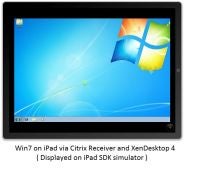
Windows 7 Running on the Apple iPad via Citrix

Trumpets playing, bloody moons, seas of fire, cats cohabiting with dogs, and Windows 7 running on the Apple iPad right on the day it launches. That's how the Universe ends, my dearly beloved, and you can blame Citrix for it:


It turns out the 9.7 inch display on the iPad with a 1024x768 screen resolution works great for a full VDI XenDesktop. Windows applications run unmodified and securely in the data center, and even multiple applications at once.

The iPhone restrictions of screen size and small keyboards are overcome with the iPad. The iPad looks to be an ideal end-point device that can empower users to be productive wherever they are and IT will be able to safely deliver company-hosted virtual desktops and apps without worry.

Those are the wet words of Chris Fleck, the vicepresident of virtualization and remote software company Citrix. And what you are seeing above is Windows 7 running on the iPad SDK simulator, thanks to Citrix Receiver and XenDesktop 4—running meaning that it's executed on a server and remotely displayed on the iPad at full resolution.

Fleck sounds excited on his blog, and points out that the software will be ready for the launch of Apple's JesusTablet. Personally, I can't wait for other remote desktop applications to be adapted for the iPad full resolution.

[Citrix via PC World]
Read More

10-inch EROS Tablet demoed, navigating through Windows 7 by touch [Video]

Mentioned a couple of weeks ago, the EROS tablet created by the Chinese is given a video demo of sorts today, as we see it pulling its little self together in the eleven minute long video. Performance looks to be on par of an Intel Atom powered netbook. Well that and the sub 2-hr battery life.


The touchscreen display seems to be fairly responsive to both writing by a stylus as well as flicking photo shots and pages in a comic e-book. Although the stylus is given much more time than the reviewer’s own digits, revealing that Windows 7 is a far cry from being truly digit-friendly.

Microsoft’s implementation of Windows 7 menus may not be the best suited to a touchscreen interface. Mac OS X maybe another story, as evinced here. Will we soon have a purely finger-driven tablet device running an actual well-to-do OS?

Read More

Friday, January 29, 2010

Windows 7 On an iPad? Yes You Can

Want to run Windows 7 on the new Apple iPad? Citrix says it will soon be possible--at least virtually--using a new version of its Citrix Receiver software.

Promised to be ready when the tablet computer ships in March, Citrix says the new software, based on the current iPhone version, is a response to questions about how the iPad might find a home in the enterprise.

"If your company has XenDesktop or XenApp you will be happy to know you will be able to use your iPad for real work as well," wrote Citrix Vice President Chris Fleck in a company blog.

"It turns out the 9.7 inch display on the iPad with a 1024x768 screen resolution works great for a full VDI XenDesktop. Windows applications run unmodified and securely in the data center, and even multiple applications at once."

Citrix says the iPad's larger screen solves many of the challenges users' faced because of when using the iPhone with a virtualized Windows desktop. (Which sounds pretty painful, if you ask me).

"The iPhone restrictions of screen size and small keyboards are overcome with the iPad. The iPad looks to be an ideal end-point device that can empower users to be productive wherever they are and IT will be able to safely deliver company-hosted virtual desktops and apps without worry," Fleck wrote.

While it might be interesting to add iPads to a company's enterprise environment, Fleck admits the new Receiver software might also be a way for customers to justify the purchase of tablets that employees will buy anyway.

"Let us know how you're going to put it to work," Fleck writes, concluding his post, "Even if it's just to rationalize buying another gadget."

The iPad isn't likely to be perfect for many business apps, besides presentations, but companies already supporting virtualized desktops many find applications and users that make sense for Apple's new tablet.
Read More

Microsoft reports $6.66b Q1 net profit, Windows 7 'fastest selling OS in history'

With a boost from the release of Windows 7, Microsoft on Thursday said that its quarterly revenue topped $19 billion as the company sold a record number of copies of its operating system.

The software maker said it earned $6.66 billion, or 74 cents per share, on revenue of $19.02 billion for the three-month period that ended December 31. Those results included revenue deferred from the prior quarter, as the company was preparing for Windows 7 and offering free upgrades to those who bought Windows Vista-based computers. Excluding the deferred revenue, Microsoft said it had revenue of $17.31 billion, and diluted earnings per share would have totaled 60 cents per share.

"Exceptional demand for Windows 7 led to the positive top-line growth for the company," chief financial officer Peter Klein said in a statement. "Our continuing commitment to managing costs allowed us to drive earnings performance ahead of the revenue growth."

Chief Operating Officer Kevin Turner touted the record quarter for Windows unit sales, spurred by the Oct. 22 launch of Windows 7. "We are thrilled by the consumer reception to Windows 7 and by business enthusiasm to adopt Windows 7," he said in a statement.

The company said that through the end of December it had sold more than 60 million Windows 7 licenses, which it said made Windows 7 the fastest selling operating system in history.

In October, Microsoft reported better-than-expected sales, also boosted by stronger demand for Windows.

The company said overall PC sales grew 15 percent to 17 percent in the quarter, although that was led by a 20 percent growth in consumer sales as the business market remained roughly flat. The market for new servers remained weak, down slightly year over year, although Microsoft's server and tools business unit managed to grow revenue 2 percent as compared with a year ago.

Microsoft's online unit saw its revenue dip 5 percent, led by a 2 percent drop in online advertising, although the company noted that its Bing search engine continues to gain market share.

The Microsoft Business Division, which includes Office, saw sales off 3 percent, perhaps as customers await this year's launch of Office 2010.

On the Xbox side, Microsoft said it sold 5.2 million consoles during the quarter, down 13 percent from a year ago, leading the entertainment and devices unit to post a double-digit decline in revenue.

The company didn't give a full forecast for the coming quarter, saying it would have more to say on a 2:30 p.m. PST conference call. It did tell analysts to expect operating expenses for the full fiscal year ending June 30 to total $26.2 billion to $26.5 billion.

Here's a chart of how each of Microsoft's individual business units performed:


On its conference call, Microsoft executives said that essentially all of the company's growth came from the consumer side of its business. Business spending stabilized some in the quarter, but is not yet seeing growth, Microsoft said.

Netbooks were about 11 percent of the market, roughly flat with both the prior quarter and a year ago. Microsoft said that 90 percent of those devices were running Windows, with Windows 7 accounting for "well over half of that."

Microsoft executives "continue to be hopeful" that the company's Yahoo search deal will be approved by regulators early this year. The software maker said that it cut 800 jobs during the quarter and that its staff levels are down 8 percent from a year ago.

Looking forward, Microsoft said that it sees some reasons to be optimistic.

"Heading into 2010, we are encouraged by the possibility of improving market conditions," Klein said, as well as by new products like Project Natal and Office 2010.

The company also says it expects some improvements over the next two quarters in server shipments, which have been declining for several quarters. The company said it also sees a pick-up in online ads. "The outlook for online advertising appears to be improving," Klein said.
Read More

Thursday, January 28, 2010

Does Windows need more padding to fend off Apple's iPad?

As the author of a blog that’s “All About Microsoft,” I watched yesterday’s Apple iPad unveiling with interest — as many Microsoft employees, partners and customers did, given that Apple is Microsoft’s only viable competitor in the PC operating space.


Most interesting to me, after all the Twitter and live blogging dust settled, were the various calls for Microsoft’s response. I read a few blog posts and tweets claiming Apple’s move really boxed in Microsoft and its partners. More than a few Tweeters called for Microsoft to rush out its rumored next-generation slate, codenamed Courier, to blunt the iPad’s impact. And then there was Nick Carr’s “The PC Officially Died Today.” (An odd way to look at things, given that the iPad is being billed as an addition to Apple’s PC line-up, not a replacement for Macs.)

Microsoft “response” to the iPad is Windows 7. Windows 7 on slates, tablets and other small form factors created by various PC makers. Like the iPad, many of these devices provide touch capabilities, access to productivity apps and the ability to consume music, photos, video, ebooks and other kinds of content. Unlike iPads, many also include tools for creating content, too, plus various social-networking tools and built-in keyboards. Even netbooks — supposedly beneath Apple, but as of yesterday, acknowledged by CEO Steve Jobs as an iPad competitor — can do what the iPad can (and more), though not as “elegantly” or quickly.

Some of Microsoft critics — but also some of its backers — think Windows 7, as it currently exists, isn’t enough of a response. It doesn’t really matter whether CE, Windows or Windows Mobile inside (the iPad runs the iPhone OS), they argue. What matters more is the fact that Windows 7 isn’t optimized for slate-like devices. Touch is enabled, but as a curiosity, not as the primary way a user would interact with the device, they say. Microsoft — or some vendor — needs to create a shell/user interface that sits on top of Windows 7 that turns it into a slate-centric machine, some claim.

I wouldn’t be surprised if Microsoft has a team somewhere working on that very task. (I asked recently and was told the Softies had nothing to say there.) Or maybe Windows 8’s UI will be NUIfied (natural-user-interfaced) so that it makes touch more of a first-class input citizen. Or perhaps if and when the Windows Mobile team delivers a touch experience that people actually like (hello, Zune), some of that technology/influence could make its way into Windows…

Michael Cherry, an analyst with Directions on Microsoft, said he doesn’t expect any major shifts from Redmond because of the iPad.

“As to what Microsoft will do, I suspect that they will continue to push their tools and languages, and that whether it is Windows 7 or Windows CE it is still Windows, even though for devices, I think that downplaying Windows elements such as the start button, menus, and other Windows UI components is the way to go,” Cherry said. “When I look at an iPhone or an iPad, even I, an OS junkie, never say ‘Wow, I want that phone it runs Apple OS X.’ I have never bought a TiVo because it runs whatever OS it runs, I buy it because it really makes it easier to record the programs I want to watch. I have looked at a Windows Mobile device and rejected it because I don’t want to begin navigation of the features from a start menu. What an unnecessary hassle particularly with touch.”

I’ve written before that I’m not a fan of device convergence, as I’d rather have several different devices that do one or two things well than one that does a bunch of things in an OK way. Will an iPad replace a PC? Not in its current incarnation. A mobile phone? Nope — too bulky. An ebook reader? Unless it can beat Amazon’s prices and offer a non-back-lit reading experience with better battery life, not in my book (or one New York Times writer’s, either). It’s a device without a compelling purpose.

In spite of those calls for Microsoft to retaliate, I’m sure the biggest response from yesterday’s unveiling among Microsoft’s execs and partners was a sigh of relief…. especially given that Microsoft is due to report its second quarter fiscal 2010 earnings later today.
Read More

Tuesday, January 26, 2010

HP Slate: Coming 2010, Way Less Than $1500, Plain Old Win 7

HP just popped a video of CTO Phil McKinney demonstrating the "slate" we showed you first at CES 2010. McKinney affirms that this is not just some will-o-the-wisp, but in doing so, might've taken away some of its allure.


The highlight of Steve Ballmer's slate introduction was the different modes—ebook reader, movie player—you can quickly jump to. But then and now, the story is really Windows, and those modes are just apps, running with the Start menu and all the familiar Windows accoutrements in full view. Being powered by Windows 7 is great, but I am not sure how I feel about this approach. What we see here is a Windows 7 desktop running a browser and a NYT app (aka another browser). I still think it's cute, but I think everyone would agree that the hardware is not the story—smoother software is needed to make the tablet lifestyle palatable.

It's still early, and knowing HP's TouchSmart team, something is in the works, at least a nice skin. McKinney promises to deliver the product "in 2010," and for a price that's "in the affordable range," that is to say, much less than $1500. I'm not even going to guess. Here's hoping that HP and Microsoft can pull off an impressive product of their own, to rival Apple's as-yet-unseen frontrunner in this battle of vapor and wills.


[HP on YouTube]
Read More

Monday, January 25, 2010

PC gamers love Windows 7

It seems that PC gamers, specifically those who use Steam, love Windows 7.

In a recent survey carried out by Steam, Windows 7 showed itself to be very popular amongst gamers, installed on a whopping 23% of the Steam gamer’s PCs. Interestingly, 64-bit Windows 7 holds a commanding lead over it’s 32-bit brother, with 15.61% and 7.45% shares respectively.

Here’s the OS breakdown:
Windows XP 32 bit - 44.77%
Windows Vista 32 bit - 20.71%
Windows 7 64 bit - 15.61%
Windows Vista 64 bit - 10.00%
Windows 7 - 7.45%
Windows XP 64 bit - 0.64%
Windows 2003 64 bit - 0.64%
Windows 2000 - 0.10%
Other - 0.08%

Windows XP and Vista still have a lead over Windows 7, but I think that Vista will be surpassed by 7 pretty soon.

Let’s take a look at a few other interesting statistics on offer:

CPU:
GenuineIntel - 69.06%
AuthenticAMD - 30.94%

System RAM:
Less than 512 MB - 0.65%
512 MB to 999 MB - 4.07%
1 GB - 11.72%
2 GB - 30.94%
3 GB - 29.99%
4 GB - 15.04%
5 GB and higher - 7.59%

CPUs/Cores:
1 cpu - 18.08%
2 cpus - 56.93%
3 cpus - 0.95%
4 cpus - 23.99%
6 cpus - 0.00%
8 cpus - 0.05%

GPU manufacturer:
ATI - 29.82%
Intel - 3.61%
NVIDIA - 65.01%
Other - 1.58%
Read More

Thursday, January 21, 2010

Windows 7 way hotter than Vista off the line, now more popular than all OS X versions


We learned back in November that Windows 7 was having a much (much!) better first few days in retail than Vista did when it launched, but now that the system has had a full quarter and change to make an impression, it looks as if that growth isn't slowing down. According to new figures from Net Application, Win7 is achieving a higher level of market penetration in a faster amount of time than Vista did; after a month, Vista was stuck at 0.93 percent, while Win7 nailed the 4 percent mark. After two months, Win7 jumped to 5.71 percent, while Vista was barely over 2 percent after the same amount of time. 'Course, the newest version of Windows had a holiday season to help it out right from the get-go, but there's still no denying that people are flocking to the system even now. What's most interesting, however, is that the overall market share of Windows 7 alone has now surpassed all OS X versions that are being tracked (10.4, 10.5 and 10.6), so put that in your pipe and smoke it. Smoke it long and hard.
Read More

Tuesday, January 19, 2010

Apple Boot Camp 3.1 Update to support Windows 7

Apple has updated its Boot Camp software today so Mac users can finally run Windows 7 officially, with newly issued drivers and utilities. The Boot Camp 3.1 update provides support for both 32-bit as well as the 64-bit Home Premium, Professional, and Ultimate versions of Windows 7.


The software update furthermore includes Magic Mouse and Apple wireless keyboard support, as well addressing some Apple tracpad and laptop LED issues. The 32-bit version is 380.73MB, while the 64-bit update is 274.58MB in size.

Also, the first security updates of the new year for Snow Leopard and Leopard were released. Security Update 2010-001 is recommended for all users of Mac OS X, and addresses a quantity of potentially unsafe security issues.

We're hearing reports that the 27-inch iMac is responding to Windows 7 with the Black Screen of Death, so make sure you use this tool from Apple before installing Windows 7. Too late? Then you'll have to manually remove the offending default ATI drivers by starting from point 4 on this page (hold down Option key while booting up to select the Windows install disc, by the way), and then try the Boot Camp update again.
Read More

Friday, January 15, 2010

DigitalRise X9 multitouch tablet includes Intel Atom, Windows 7; priced at $780

There’s another tablet on the table: the DigitalRise X9 multitouch-screen tablet has made its way into the fold. With its strong specs, it could be a strong competitor - if it weren’t for the hefty price tag.


With tablets becoming the hot ticket item of the year, DigitalRise has implemented quite a bit beneath that 10.2-inch color TFT touchscreen, including:
Intel Atom N270 1.6GHz processor
Windows 7
160 GB SATA hard drive
2 GB RAM
3000mAh Li-ion battery
GPS
3G
1.3-megapixel webcam
SD/MS/MMC/MS-Pro card reader

But this won’t come cheap: $780, which seems a bit on the expensive side for a tablet. So if this piques your interest, don’t drop it.
Read More