Showing posts with label Google Chrome OS. Show all posts

Monday, February 01, 2010

Don’t Think Chrome OS Will Compete With iPad? Watch This Video.

Late last week, I wrote a post about how netbooks running Chrome OS and the iPad were on a collision course. Some people took exception to that, noting the iPad was only a touchscreen device while Chrome OS was created to be used with more traditional computing form factors, like netbooks and laptops. But there’s a new concept video that has surfaced on a Chromium Project page that very much shows how the two could and should compete head-on in the touch tablet space.

Again, this is just a concept video at this point, but it clearly shows what the people building Chrome OS are thinking about for future products. Oh, and in case you’re worried that since Chromium OS is an open source project, this is just some random person making these videos that Google is unlikely to use for Chrome OS, they were made by Glen Murphy, a Googler working on Chrome (with a sense of humor).

Clearly, the tablet in this video is bigger than the iPad, but don’t rule out Apple making a larger tablet as well. It’s worth noting that Google’s tablet concept video was uploaded January 25, two days before the iPad unveiling.

For more of a taste of what Google has in mind with these tablets, check out the concept pictures as well. Watch the video below.

Read More

A First Taste Of What The Google Tablet Interface Will Look Like (Pics)


Last week, the world saw Apple’s long anticipated tablet device, the iPad, for the first time. In the aftermath since that announcement, a few things have become clear: it will be great for some people, but its apparent lack of flexibility (at least in its first iteration) may leave something to be desired. It’s increasingly looking like the best alternative will be Google’s Chrome OS, which is clearly on a collision course with the iPad. And tonight, we’ve come across some very impressive mockups of what Chrome OS may look like on a tablet form factor.

The photos have been posted to the official Chromium site (Chromium is the open source project behind Chrome and ChromeOS). And while Chromium is not actually part of Google, it appears that these mockups were put together by Glen Murphy, Google Chrome’s designer. In other words, there’s a good chance that the final version of Chrome OS will resemble this.

It’s worth pointing out that there almost certainly will be multiple “Google Tablets”, given that Chrome OS won’t be tied to a single device. That said, Google is working with select hardware partners to ensure that it runs on devices that are up to its specifications, and there may be one tablet device that is designated as the “Google Tablet”, much like the Nexus One is the “Google Phone”.


[Via TheChromeSource]
Read More

Saturday, January 30, 2010

The iPad And Chrome OS Netbooks Are On A Collision Course

“We don’t know how to build a $500 computer that’s not a piece of junk.”

“Netbooks aren’t better at anything.”

Those two quotes are both from Apple CEO Steve Jobs. The first was during an earnings call in late 2008 when Jobs fielded a question about why Apple wasn’t cutting prices amid the rising success of netbooks. The second came on Wednesday as Jobs was unveiling the iPad.

Apple has made it clear all along that they had no plans to build a netbook. And true to their word, they haven’t. But that doesn’t mean that Apple didn’t feel there was a need for a device that resided in between a full laptop and a mobile phone — in fact, that’s squarely where Apple is positioning the iPad. With it, they feel that they’ve created a $500 (for the baseline version) device that is superior to every netbook out there.

Meanwhile, Google has decided to target the market in between the laptop and the mobile phone as well. But whereas Apple is anti-netbook, Google is very pro-netbook — they just want to make them better. That’s the reason behind Google’s Chrome OS, as Google clearly laid out during its unveiling event late last year.

And so yes, we once again have Google and Apple on a collision course.

Now, it remains to be seen if people who buy an iPad will do so instead of buying a netbook. At first, I’m not so sure that will be the case. But it stands to reason that eventually, this will happen. And as Jobs’ comments on stage on Wednesday made abundantly clear, that’s Apple’s idea too. In their eyes, you shouldn’t buy a cheap, underpowered PC, you should buy an iPad, their anti-netbook.

Google, which plans to release its first Chrome OS-based netbooks in time for the holiday season next year, can’t like that plan too much. They have promised that netbooks that run Chrome OS will be better than current netbooks because they’re dictating certain minimum requirements (such as big keyboards) to manufacturing partners. But Chrome OS netbooks won’t be able to match the sex appeal of the iPad’s multi-touch screen. However, what they can offer is a familiar experience (much more like a traditional laptop then an iPad), and that will be appealing to a lot of people.

And what’s interesting is that for either of the two to be massive hits, they both will need consumers to continue to feel comfortable moving away from traditional software applications such as Microsoft Office. But their plans to get consumers to do that are very different. Google wants everyone to move towards doing everything on their apps in the cloud. Apple, as they made clear with their overly-long iWork for iPad demo on Wednesday, wants everyone to move towards using iPhone OS-based apps.

And that’s why this battle coming at the end of this year will be interesting to watch. Both Apple and Google are very popular with consumers, but their offerings are very different — while aiming for the same market. And as two companies that were once as close as could be, it’s also fascinating to watch the tension and awkwardness as they now compete in an ever-growing number of areas.

If this market between laptops and smartphones proves big enough, perhaps the two frenemies can once again find a common ground and band together to defeat their common enemy: Microsoft. But the obvious strategy for this used to be that Google would attack Microsoft from the bottom with its Chrome OS netbooks, while Apple attacked from the top with their premium computers, leaving Microsoft squeezed in the middle. With the iPad now clearly aimed at netbooks thanks to its pricing and Apple’s positioning, everything is different.
Read More

Friday, January 22, 2010

Google devs reveal Chrome OS will have media player

If you thought Chrome OS was all about the Chrome, here are some words of reassurance from Google's Matthew Papakipos, engineering director for the project. In a marathon interview with Ars Technica, he notes that Chrome OS will have its own integrated media player, and although the focus remains on being "lean and mean," it'll not neglect basic system functionality. Current thinking is to keep JPEG and other media file handlers within the tab structure, with native and web apps being melded seamlessly into the browser experience. That may all still change, of course, since development is also noted to be a good year away from a consumer release. Hit up the read link for more, much more, on the past and future of Google's featherweight OS.

Read More

Saturday, January 02, 2010

Rumor: Google and HTC Working On a Chrome OS Tablet in A few Months

Everyone is clamoring about tablets these days—ourselves included—so it's not too surprising that Google and HTC are set to join the fray. They are reportedly working together on a Chrome OS Google Tablet.


Smarthouse, an Australian publication, reports that HTC and Google have been collaborating "for the past 18 months" and have produced "several working models of a touch tablet," including one outfitted with Google's Chrome OS. We wrote why a Google Tablet would be a good idea last month, and with the Apple Tablet discussion reaching a fever pitch, it's harder and harder to get excited about a Chrome OS netbook from Google.

Having collaborated on the Nexus One, a smart phone that impressed us with its design as well as its hardware, HTC and Google partnering on a tablet seems like a promising prospect. But will it "compete head on" with Apple's tablet as Smarthouse claims? Probably not.

From what we know, it seems like Apple is putting as much effort into their tablet's content as they are into the gadget itself. We've written extensively on how an Apple tablet could redefine newspapers, textbooks, and magazines. In the last case, we've already salivated, more than once, over concepts for how magazines might evolve in a multi-touch future. Add that to Apple's recent acquisition of Lala, a move that likely points to a cloud-based future for iTunes, and the reports that Apple is trying to secure TV show subscription packages for the iTunes store. Admittedly, not a whole lot is certain about Apple's tablet. But you start looking at all of those pieces and how they might fit together around one device, you can easily envision a gadget that is focused on streaming the stuff you read, the stuff you listen to, and the stuff you watch.

It's hard to foresee a future in which a Google Tablet tries to go head to head with Apple on the content level. That's not to say, however, that there aren't some compelling things that could be offered by a Google tablet. As the launch of Google's Chrome OS made clear, they're looking toward a future with a multitude of devices that can access the Internet quickly, cleanly, and cheaply. A Google Tablet could be just the thing to realize all of those goals. When we tried out the JooJoo tablet, we saw how a well-designed tablet for consuming web content could provide an engaging experience. A Chrome OS tablet by Google would likely work the same way, keeping typing to a minimum and offering a literal hands-on web surfing experience.
Read More

Monday, December 28, 2009

Google’s Chrome OS netbook specs revealed

Back when a Google-branded Chrome OS netbook was tipped for late 2010, we were still in the dark regarding potential specifications for the web-centric ultraportable. Now IBTimes is claiming to have the official spec sheet, and as speculated there’s both an ARM-based CPU and NVIDIA’s Tegra chipset among the components. There’s also a 10.1-inch display with multitouch-capable touchscreen mentioned, able to display HD – likely 720p – video, together with a 64GB SSD and 2GB of RAM.

Connectivity is believed to include WiFi, Bluetooth and 3G, together with ethernet, audio in/out and a multiformat memory card reader, and there’s a webcam too.

A sub-$300 price tag is tipped, thanks to both Google and carrier subsidies, and the search giant are expected to preload their usual batch of applications including Google Maps, Google Voice and Google Docs. The only unusual element is the relatively large amount of local storage; Google have previously said that cloud storage will be primarily used.
Read More

Friday, December 18, 2009

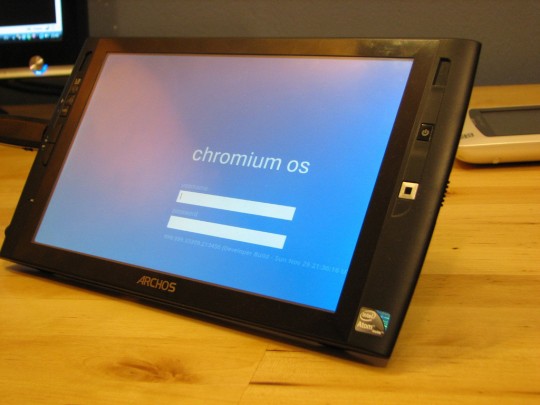
Archos 9 dumps Win7 for Google Chromium OS


Windows 7 Starter Edition wouldn’t be our first choice of OS for the Archos 9 PC Tablet – after all, it lacks the handwriting functionality you’ll find in other versions – but at least it recognizes the touchscreen. Steve from UMPC Portal decided to load up Chromium OS on his Archos 9 (which we saw unboxed yesterday) but the end result is less than usable: since Chromium doesn’t recognize the touchscreen, nor have an on-screen keyboard, you’ll basically be stuck looking at the login page.

Of course, since you can plug in a USB keyboard and use the optical mouse, there are workaround ways to actually reach the Chromium OS desktop. That doesn’t add up to a particularly mobile solution, however; consider this a call to arms for Chromium OS developers to whip up some tablet-friendly features.
Read More

Thursday, December 17, 2009

Get Ready For The Google Branded Chrome OS Netbook

Most of the tech world now considers it a given that Google will be selling its own unlocked phone, called the Nexus One, to customers directly early in 2010. A few stragglers are still debating the finer points of the difference between Google working with handset manufacturers and carriers on a good Android experience v. them dictating the hardware specs and selling it directly to users. While they work that out for themselves we’re off to the next story – the Google Chrome OS Netbook (although we think Google has a few surprises left around the Nexus One, too).

Google has said from the beginning that they plan on working with select manufacturers to ensure a good Chrome OS experience for users when devices first hit the market next year. From an early FAQ: “The Google Chrome OS team is currently working with a number of technology companies to design and build devices that deliver an extraordinary end user experience. Among others, these companies include Acer, Adobe, ASUS, Freescale, Hewlett-Packard, Lenovo, Qualcomm, Texas Instruments, and Toshiba.”

Most people assume that “working with” around Chrome OS means the same thing as “working with” around Android – lots of meetings to make sure the devices and software work together as well as possible. But sometimes those pesky hardware guys just don’t do things quite right. And when you’re competing against Apple, everything most definitely needs to be quite right.

That may explain why Google has, according to multiple sources, been talking to at least one hardware manufacturer about building a netbook for Google directly. As in Google gave the company a RFP with quite detailed technical specifications and has begun discussions on building it.

They’re not in any particular hurry and seem to be aiming for the 2010 holiday season, a full year from now. Our understanding is that Google intends to have the devices built, branded with Google, and then sell them directly to consumers. The only firm tech spec we’ve heard is that they’ll be mobile enabled, and likely tied to one or more carriers with a subsidy.

I’m dying to get my hands on that RFP and have been feverishly calling our contacts in Taiwan and China to see if we can get someone to quietly hand it over to us. In particular I want to know whether Google is going with an Intel Atom processor, the current leader in netbooks, or may be considering an ARM CPU. I’d be willing to bet one of our writers’ right hands that it’s ARM. And I’d even go out on a limb and suggest that they may very well be targeting Nvidia’s Tegra line. Those chips are outperforming Atom in every way, say some of the hardware guys we know. HD Flash video no problem (something the Atom can’t do), and at a fraction of the power usage.

What does that mean? It means next Christmas you may be getting a high performance Google branded netbook running Chrome OS for next to nothing. And if it’s running ARM, Intel is going to be freaking the hell out about it.

As an aside, if you need a netbook now, I’d recommend the Nokia Booklet 3G. It’s amazing, and you can get it for $300 with a 2 year AT&T data plan. Nokia may not be able to make phones anyone gets excited about any more, but that netbook is cool.
Read More

Friday, December 11, 2009

Google's Chrome OS Aims to Speed Up Netbooks

Look for Google’s lightweight, browser-based operating system to debut on mobile systems sometime in 2010.


A few weeks ago, Google unveiled what it's hoping will be the new standard in netbook operating systems: Chrome OS. Based on Linux, Chrome OS is a fast, low-overhead OS that boots directly into a Web browser to get you online with as little waiting as possible. We've been running an early version of Chrome OS on our test systems since Google released the code to the open-source community. Here's a peek at what you can expect to see when preinstalled systems debut for the 2010 holiday season.

Because Chrome OS runs exclusively on solid-state drives, it boots extremely quickly. The early build we played with took as little as 7 seconds to reach a login screen, and then snapped almost instantly into the browser.

Unlike traditional operating systems, Chrome OS offers few controls that you can't already find in Google's Chrome Web browser. The most significant difference is the Chrome icon in the upper-left corner, which reveals a list of bookmarked Web apps. It's as close as Chrome OS gets to installing software. While the inability to install apps as Windows does can be a limitation, it's also a safeguard against viruses and malware: If apps can't install, neither can Trojan horses and other nasty bits of code.


Like the Chrome Web browser, Chrome OS is tab-based. However, to keep your favorite Web apps handy at login, the OS gives you the option to pin tabs to the left side of the tab bar. Once pinned, a tab remains in the same location every time you log on, so it's always exactly where you left it.

Apart from a battery icon, a clock, and a network monitor in the upper-right corner, the operating system is identical to the existing Chrome browser for Windows. The whole idea is simplicity, and that's exactly what you get.

No Chrome OS devices have yet debuted on the market, and none are expected before the second half of 2010. Acer has declared that it will be among the first manufacturers--if not the very first--to release a netbook with Google's operating system preinstalled. Meanwhile, Chrome OS already has some competition from the FusionGarage JooJoo, a 12.1-inch tablet device running a similar browser-oriented OS.
Read More

Thursday, November 26, 2009

10 Things Microsoft Can Do to Beat Chrome OS

Chrome OS might be the latest big thing in cloud computing, but that doesn't mean it can't be thwarted before it is released and has a chance to become a widely proven success in the industry. Google won't release a production version of Chrome OS for months. This gives Microsoft plenty of time to develop technological and market strategies to counter Chrome OS' competitive challenge. Here are some of the basic strategies Microsoft needs to follow.

Now that Google has shown its Chrome OS hand, it has made it abundantly clear what it plans to do with its online operating system over the next year. For many, those plans are exciting. Chrome OS promises to offer some of the most unique services of any operating system on the market. It could also rival existing leaders from Microsoft and Apple, as well as Linux OSes.

But there is a chance that Chrome OS could lose its ability to capture significant market share at the hands of Microsoft. The software giant that currently controls the operating system market can't possibly be expected to roll over and allow Google to be the only company offering an online OS. It also can't be expected to allow Google, its main nemesis online, to capture any of its market share. Realizing that, Microsoft is likely to have a plan to beat Chrome OS. Let's take a look at what Microsoft can do to beat Google's operating system.

1. Keep working on Windows 7

Windows 7 is a fine operating system that many folks are quite happy with. But it's the single OS that Google is targeting with Chrome OS. Microsoft needs to work hard to improve Windows 7 as Google prepares its online OS. It also needs to ensure that it attracts as many customers as possible. The happier the customers, the less likely they will be to move to Chrome OS.

2. Embrace the Web

At the same time, Microsoft should embrace the fact that future is on the Internet. Although Office is a promising next step for Microsoft online, it needs to work hard on Windows Azure. By doing so, it can cut Google off as it attempts to be the only company in the space doing something unique online. It will also divide the market into those who want Google's OS and those who want Microsoft's.

3. Point out Chrome OS shortcomings

There's nothing quite like explaining the shortcomings of a particular operating system to illustrate why your own operating system is ideal. The strategy works. Just look at Apple's "I'm a Mac, I'm a PC" ads for proof of that. If Microsoft wants to limit the impact Chrome OS will have on the market while working toward an eventual defeat of the online OS, it needs to start with some advertising.

4. Stay true to the enterprise

One of Chrome OS' major shortcomings is its lack of enterprise support. Say what you will about Windows, but the OS is perfect for the corporate world. If Microsoft wants to get in on the online-OS market, it needs to stay true to companies that don't want to be left behind. Google is leaving those companies behind. Microsoft can't.

5. Enhance Windows 7 Starter Edition

Chrome OS isn't necessarily a threat to any Windows 7 edition other than Starter. Realizing that, Microsoft should spend the next year improving Starter Edition to better compete against Chrome OS when it's released. Yes, that means adding back some of the (many) features users won't find in Microsoft's simplest operating system version.

6. Play even nicer with developers

One of the big factors that has yet to fully play out regarding Chrome OS is how software will be integrated into the operating system. For now, it features several Web apps that users can access, but what about more capable software that is slowly making its way online? If Microsoft really wants to beat Chrome OS, it needs to provide the platform that has what software users want. That can only happen through strong relationships with third-party developers. Microsoft needs to get to work on that immediately.

7. Work on multiple online properties

Another key component in Microsoft's strategy to beat Chrome OS must be the improvement of its other online properties. Bing is a great search engine with several neat features. Bing Maps is arguably better than Google Maps. Microsoft needs to continue improving its online services to attract more users from Google. That could help limit Chrome OS' impact online.

8. Use some cash

If Microsoft has anything, it has money—and lots of it. The company should use some of that financial muscle to develop an operating system superior to anything Google plans to do with Chrome OS. It could also use that cash to acquire some companies that would help in that endeavor.

9. Improve security

One of the main topics Google will touch on with Chrome OS is its security. Undoubtedly, the company will talk about why Chrome OS is more secure than Windows. Realizing that, Microsoft needs to work diligently to improve the security of its platform over the next year. If it can, Google won't be able to depend on making use of the security issue that has consistently haunted the software giant.

10. Prepare for the future with Windows 8

Finally, Microsoft needs to prepare for the future with Windows 8. Windows 7 might have only hit store shelves in October, but Chrome OS looks toward the future. Microsoft needs to plan for the future of computing that will be increasingly built on cloud computing and ensure that Windows 8 is closely aligned with this trend. At the same time, it needs to remember the customers, particularly in enterprises, who want to stick with conventional computing. If it does so, Microsoft will have the market covered. And that will only spell trouble for Google.
Read More

Wednesday, November 25, 2009

Why can't Google be more like Microsoft?

Jeff Haynie has a wish. He wishes that when building an operating system, Google was as open as Microsoft. Or at least as open as Apple.

He's well aware that Google likes to open source Android code. He realizes the company just freed code for an early version of its netbook-happy Chrome OS. And, yes, he heard über-Googler Sundar Pichai say that Google devs would work on the same Chrome OS code tree as developers outside the Mountain View Chocolate Factory.

But judging from the rather closed nature of the open source Android project, Haynie argues that Pichai's words were, shall we say, on the disingenuous side.

Haynie is the founder and CEO of Appcelerator, a Silicon Valley startup whose Titanium development platform is a kind of Chrome OS counter-play. The open source platform lets you build native mobile and desktop applications using web-happy development languages, including Javascript, Python, and Ruby on Rails. Google's Chrome OS, by contrast, is a web-happy operating system that doesn't run native applications. If you can call that an operating system.

But Haynie's Titanium builds apps for Google's other OS. It churns out native runtimes for Android as well as Microsoft Windows, Apple's iPhone, and the Mac OS - among others. Having dealt with all three tech titans, Haynie much prefers the open practices of Apple and Microsoft to the preternaturally closed setup at Google. Open sourcing aside.

Apple and Microsoft at least provide developers with a near final version of a new OS months before it reaches the rest of world, letting them test drive the platform under a non-disclosure agreement. Before the iPhone 3.0 arrived, Haynie had more than enough time to get his ducks in a row.

But Google plays a different game. It says it's open. But in reality, it completes a new OS entirely behind closed doors. Then it dumps the final version onto the web just days before it reaches the commercial market. Android 2.0 hit the web little more than a week before it turned up on Motorola Droid phones and Haynie's customers started complaining about broken applications.

Google hadn't even warned devs that a new version was on the way - unless you count a Youtube video of giant eclair.

"Google pushes big snapshots of code to the open source tree only at certain times," Haynie tells The Reg. "It's not like, say, Mozilla. Everything Mozilla does is in the open. It's never a big surprise, like 'Hey. Here's this new piece of code called Android 2.0'"

Yes, it's nice that Google open sources stuff. As Google will tell you, the company has opened up more than a million lines of code over the years. But that says only so much about its development practices.

When Google VP of product management Sundar Pichai says that Google coders will work on the same Chrome OS code tree as external devs, you can't help but think he's misleading the masses. Yes, we have a snapshot of Google's preliminary code. But between now and the OS's official release next year, you can bet the real development will happen inside the Chocolate Factory - until Google thinks the time is right to open source another snapshot.

After the first Chrome OS netbooks arrive next year, Google will no doubt open source revised code. But until then, the developer world is on the outside, trying desperately to look in.

That's the way with Android. Google codes behind closed doors. Then it open sources. Then it goes back behind closed doors and codes a new version. Google played the game with Android 1.0. And then 2.0 ('Eclair'). And you can expect the same from 3.0 ('Flan,' apparently).

Yes, this is Google's prerogative. But for developers like Jeff Haynie, it's a hassle. And it's indicative of a much larger irony. As Google paints itself as an open company merely interested in the good of users and developers everywhere, it provides preciously little insight into what it's actually up to, leaving devs to wonder what role they might play in something that's shaping up to be a vastly restructured computing paradigm.

But surely the answer is obvious: Developers have almost no place in Google's grand plan - unless they're developing for the web. But there are doubts for web devs as well. And with Google dictating hardware terms for the Chrome OS - not to mention the swirling rumors of a Google-branded Googlephone - even hardware developers can't be sure of their place in Google's world.

Chrome OS isn't built for developers. It's built for Google. And online advertisers.

Playing dumb

Sundar Pichai's bit about the Chrome OS code tree was only the second most disingenuous statement of the day. Asked if Chrome OS was Google's attempt to unseat Microsoft on the desktop, co-founder Sergey Brin played, yes, dumb. "Call us dumb businessmen," he said. "But we really focus on user needs rather than think about strategies relative to other companies and whatnot."

At least Apple and Microsoft admit they're Fortune 500 companies interested in making large amounts of money. At least Apple and MS developers know where they stand. Google won't even acknowledge it has a plan, much less tell you what that plan might be.

But make no mistake: The plan is to collect your data and serve you ads. It's no wonder Google is open sourcing its OS code. It doesn't sell software. And it never will. It's an advertising company merely interested in tracking what you do - and targeting your eyeballs accordingly.

That's why Chrome OS has shut out native applications - not to mention local data. Google talks of speed and security, and that's all well and good. But there are other paths to speed and security. Google wants to force you into using its very own web-based services/data-hoarding ad platforms.

Web-based developers have a place in this world. At least, that's what Google says. It's still unclear how third parties will compete with Googly services. But even if Chrome OS is wonderfully open to third-party web devs, this leaves out far more than just Microsoft - Google's bete noir. If it can't run native applications, it can't run Skype. It can't run all sorts of media players and IM clients. And the list goes on.

Yes, Google provides for native applications on Android. But Android's closed open source model has its own drawbacks. And with handset makers free to reuse the code however they want, market fragmentation is inevitable. Google plays down talk of market fragmentation, but in the end, fragmentation doesn't matter to Google. It's even a good thing.

Once again: Google wants you on the web - not on local applications. Sergey Brin says that one day Chrome OS and Android will merge, and we can only assume they will merge in a way that freezes out local apps entirely.

If you believe the rumors, Google may even shun its own hardware partners in its ongoing quest for ad dollars. After a widely ridiculed claim from TechCrunch that Mountain View is developing its very own Googlephone, The Times (of London) has served up a story saying much the same thing.

According to The Times, this alleged VoIP phone will use a new version of Android dubbed Flan. In case you're slow: Flan is not open source. Google won't even say if it exists.

A representative of HTC - the Taiwanese handset manufacturer - tells Appcelerator's Jeff Haynie that it has 150 engineers working inside the Mountain View Chocolate Factory. They may or may not be working on the Googlephone. But it wouldn't surprise us if they are.

With Chrome OS, Google has shown it wants control of the hardware as well as the operating system. It'll open source the alleged Flan - after leaking a video of a giant dessert onto YouTube - but don't let that fool you into thinking Google will have anything less than complete control of the entire device. If you can call it a device. It's really just an ad platform.
Read More

How to Install Chrome OS From A USB Drive

Have you already tried Chrome OS using a virtual machine, and were less than impressed? Well now you can get a feel for how Google's Web-centric operating system will run natively google chromeon your machine. The folks over at Engadget were able to boot Chromium OS -- the open source version of what will become Chrome OS -- off of a USB stick on a Dell Vostro A90 netbook. The USB bootable disc is based on the Chromium OS build of Twitter user Hexxeh, who set up a Web site where you can view all the instructions you need for getting your bootable USB up and running.

If you're ready to get your hands dirty and try out the new OS, here's what you need to know:

Get the Torrent

Before you do anything, you're going to need to download the Hexxeh's Chromium OS build. You can find a torrent link on Hexxeh's Website or you can use the mirror links found here and here courtesy of Engadget.


Set Up Your USB Stick

Hexxeh has some easy instructions for writing your Chromium OS image onto a USB stick. The instructions for Windows and Linux look pretty straightforward, but Mac users are going to have a slightly more complicated time.

http://carbon.hexxeh.net/chromiumos/windows.txt
http://carbon.hexxeh.net/chromiumos/linux.txt
http://carbon.hexxeh.net/chromiumos/mac.txt

Pick Your Machine


A major problem with Chromium OS right now is that its device drivers are in the very early stages of development. That means some parts of your computer may not respond when using Chromium OS. One of the most common problems being reported is the lack of Wi-Fi functionality. So you may have to use an Ethernet connection instead. You should also know there's no guarantee the OS will boot up at all.

If you're in the market for a netbook or laptop, and you plan on experimenting with Chromium, google chromecheck out Google's list of devices that are known to work with the latest version of Chromium OS. The list is primarily for developers who want to work with the new OS, but there's no reason you can't use it as a buying guide. The device index features a sortable checklist that lets you know if the Wi-Fi and trackpad functions are working, as well as general comments and warnings specific to each device.
http://sites.google.com/a/chromium.org/dev/chromium-os/getting-dev-hardware/dev-hardware-list
For example, you might want to stay away from the Asus Eee PC 900 if you plan to run Chrome right now. The netbook's Wi-Fi is supposed to work, but the device's fans may not run, which could cause your system to overheat. Other Wi-Fi-ready devices, according to Google's list, are the Toshiba mini NB205, and the Asus Eee PC 1008HA. The Lenovo ThinkPad T400 may also work after upgrading the Wi-Fi firmware. But before you go out and spend money on a new computer, read over Google's hardware list to make sure you are fully aware of the functionality and problems for the device you have in mind.

Booting From the USB

Once you've got your computer, and have gone through the steps of writing your bootable disc, you may find you can't get Chromium OS to boot on your Windows-based machine. If this happens, you may have to change the settings for how your machine boots up.

A word of warning: Changing the boot order means messing with your system's command prompt and BIOS. If that sounds scary, you might be better off picking up an official Chrome OS machine later next year. For the rest of you, let us know in the comments how Chromium is running on your netbook.
Read More

Tuesday, November 24, 2009

How Microsoft could kill Google's Chrome OS

Here's a scenario for how Redmond could combat Google's Net appliance OS before it gets out of the gate

Thin is in again. At least that's the message I'm taking away from the full-frontal media orgy surrounding last week's Chrome OS demo. Virtually everyone who's anyone is now singing the praises of the smaller, lighter, Web-centric desktop model at the heart of Google's still unreleased "Windows killer." And that includes Microsoft.

In fact, the folks up in Redmond are doubtless watching the entire spectacle with amusement. After months spent shadowboxing a Chrome OS vaporware ghost, the company finally has a tangible, non-ethereal target to shoot at. And shoot it will -- with both barrels.

The assault will begin with a faux olive branch. Microsoft will welcome Google to the game and emphasize how they're really not competitors because Chrome OS is targeted at a niche market. But behind the scenes, Microsoft will be quietly marshaling its troops for war. Its first order of battle will be to fire up the FUD engines and lay siege to Google's credibility.

The opening salvo will try to tie Chrome OS to desktop Linux, an unpopular platform and one that Microsoft vanquished early in the netbook revolution. By emphasizing the ugly Linux underpinnings of Chrome OS, the company can scare away less technical customers who are used to a computing environment that works seamlessly with virtually any device or peripheral.
Read More

Switched On: Chrome's shine could blind Android

It's been a year of milestones for Android in the U.S. The number of handsets with the Google-developed software has grown from one to eight. Three of the four major national carriers, including Verizon Wireless, the country's largest, now offer Android phones. HTC's Hero and Motorola's CLIQ have shown how Android supports customization by manufacturers. And the Motorola Droid has marked the debut of Android 2.0.

When the T-Mobile G1 was launched, Switched On discussed Google's growing rivalry with Apple. But now Google itself an even more formidable threat to the Android than Apple or even Microsoft. Growing out of the group that created the Chrome browser, Google's Chrome OS creates a relatively lightweight layer of hardware management code primarily for the purpose of running one native app, the Chrome browser. While Chrome OS can take advantage of local processing and resources, the OS foregoes local applications, citing a need to preserve speed, security and simplicity.

That argument resembles one Apple made in the early days of the iPhone with web apps before it committed to releasing an SDK and launched the App Store -- a reversal that's created one the most vibrant mobile software ecosystems ever seen. And unlike iPhone apps, Android apps can operate in the background. Indeed, Android's multitasking, alerts, and upgrade notifications are among the most elegant in the industry; clearly the OS development team has put a lot of thought into how to deliver the benefits of local applications in the stringent smartphone environment.

So, should developers invest in local apps for Android or is the future Web apps delivered via the Chrome browser? The mixed message Google is giving developers with Chrome OS and Android smacks of the worst kind of corporate infighting and politics where the left hand not is not only unaware of what the right hand is doing, but is also competing with it. Google postulates noncommittally that Android and Chrome OS may merge at some point, but they are unlikely to do so via entropy. Just ask Microsoft, which spent a decade trying to marry the user interface and hardware support of its consumer Windows products (95, 98) with the plumbing of its enterprise Windows versions (NT, 2000).

More seriously, the treatment of desktop and handset platforms as two disparate opportunities that have contradictory app strategies runs counter to the marketplace success that Apple has had with a unified OS X foundation running on Macs and iPhones. Even Microsoft, which has struggled to create the richness of mobile applications that it has on the PC desktop, strives to leverage developer knowledge with common development tools for Windows and Windows Mobile. Nokia, which once relegated Maemo for being fit for "PC-like" mobile experiences, is now more seriously considering integrating the Linux-based OS more deeply into its smartphone offerings. This is because handsets have finally become contextual mobile computers -- Android itself is evidence of that.

And if we can trust and enrich these omnipresent epicenters of our digital lives with third-party applications, we should certainly be able to manage apps on some tertiary PC companion. In the high-stakes competitive environment in which Android competes, developers deserve to know that sponsoring organizations believe in the value of third-party applications that engage the user with appropriate user interfaces and offline functionality. It would be a shame for Android developers and users if its path were derailed by a browser that has developed megalomania.
Read More

Chrome OS will rise or fall on the safety dance

Google has the chance to make desktop Linux secure.


By starting with a blank sheet of paper, and lessons learned while developing its browser, Google wants to build a lightweight OS for netbooks that avoids the weekly “security update” hassles of its big-time rival.

This means the processes Google is addressing with Chrome — system hardening, process isolation, secure auto-update, verified boot, intuitive account management, defenses in depth, and devices secure by default — have to be more than buzzwords.

But there is something even more important Chrome OS has to do in terms of security. That is it has to develop an ecosystem of applications around itself that are themselves secure.

This is something it has yet to do with the underlying browser (and Google is clear that the browser is the technology under its operating system). Most Chrome add-ons are Google-written. Compare it to what Firefox offers — there is no comparison.

Google has to find a way to reach out to the creators of add-ons and plug-ins, as well as applications, and not only get them supporting the OS but supporting it in the same secure way Google supports it.

This will not be easy.

An alternative is to focus on the Linux application space rather than the browser space, even though, as Google says, all Chrome OS applications will run from the browser.

In this case Google must convince Linux application developers to emulate its secure process, promising massive distribution for apps that may not now be ready for prime time.

So it’s not just about what Google’s programmers do in terms of security that will drive Chrome OS. Google needs application developers to accept its security development framework as well. That means doing the kind of marketing to developers (developers, developers, developers, developers) Microsoft has been doing for decades.

And it’s not just about doing the Ballmer dance. It’s about getting those developers to do the safety dance.
Read More

Monday, November 23, 2009

Chrome OS And The Microsoft Squeeze

Now that we’ve all actually seen Chrome OS, the immediate reaction that most are jumping to is that it won’t be killing Windows anytime soon. Obviously. But that doesn’t mean it won’t hurt Microsoft, and apply long-term pressure to the dominant OS. In fact, Google’s positioning for Chrome OS reads like a page out of Apple’s playbook, only from the opposite direction.

Google is aiming Chrome OS right at the bottom of the market. That is to say, cheap computers, netbooks. Apple, of course, takes the opposite approach, targeting the high end of the market with their high-quality and high-margin machines. If Google is successful with its Chrome OS netbooks (let’s call them ChromeBooks), what we could see is the squeezing of Microsoft, an idea I first laid out a month ago. With attacks from the top and bottom, Windows will be relegated to the middle. And ultimately, if Google has its way, marginalized.

There are a number of problems with being in the middle. First and foremost, the middle is average, boring, bland, etc. There’s nothing particularly wrong with that, unless you’re a company like Microsoft with an image problem. After years of taking hits, Microsoft is trying to revamp its image with expensive ads, new stores, and a new OS, among other things. But the middle is hard to sell. It’s neither the cheapest nor the best. It’s the thing people have to settle on.

Microsoft, of course, is also in the netbook space with Windows XP and now Windows 7. But after being a sector on fire for much of the year, signs point to a slowdown in sales. While you might think that would be bad news for both Microsoft and Google, Google’s ChromeBooks are really a new category altogether. As Google said during its event, they’re working with specific hardware manufacturers to make machines set to a certain standard. This means that they’ll have larger keyboards and trackpads than most netbooks, among other things. In other words, they’ll be better, from a hardware perspective, than most netbooks.

And they potentially serve a different purpose. A couple days ago, Daring Fireball wondered if the real key for Chrome OS (and netbooks) may be to serve as your secondary computer. But there’s really no need to wonder, Google’s VP of Product Management, Sundar Pichai, said as much during the Q&A session. “This will be a secondary device. It may be a primary device in terms of time spent on it, but we expect people to have other computers too,” he said when asked about more powerful editing software not being able to run on Chrome OS.

People aren’t buying $300 computers with the expectation of running Photoshop (which costs $700) on them. They are buying them mainly to get an extremely portable machine that can surf the web. Google’s promise with Chrome OS is the fastest way to do that.

And that’s what a lot of critics are missing (but we’ve been saying since July). Google isn’t trying to compete with a standard OS, they’re trying to help users realize that for the majority of computing they do, they don’t need one in the first place. Maybe you have a desktop computer at home for those few tasks that need dedicated native applications, and maybe that runs Windows or maybe that runs OS X. But maybe the machine that you use most of the time is your cheap, fast ChromeBook.

Though they get criticized a lot for not making a netbook, Apple also competes in this highly mobile space — their “netbook” is the iPhone. While unlike Chrome OS, the iPhone can run native applications, it speaks to a similar point: Increasingly, for most of your computing, you don’t need Windows.

The point is that consumer computing is shifting to a place where speed and mobility are paramount. The reason people are so excited about products like the CrunchPad and Apple’s tablet isn’t because they can run Photoshop — they can’t — it’s because they offer an easy way to use the Internet. Same thing with the iPhone. Same thing with Android phones. And it will be the same thing with Chrome OS and the ChromeBooks.

The difference is that these ChromeBooks will be the first devices that actually look like the traditional computers we’re used to. They will look like they could be Windows machines, but they won’t be. That’s a powerful stereotype to break. And if Google breaks that at the bottom of the market, with Apple continuing to break it at the top of the market, Microsoft will begin to feel squeezed.
Read More

Chrome OS security: 'Sandboxing' and auto updates

With most computers threatened by attacks coming through Web applications, it's no surprise that security would be a key piece of Chrome OS, Google's browser-based operating system that stores data in the cloud.

Google showed off its new lightweight operating system designed for Netbooks and cloud computing on Thursday. As anticipated, it will rely on many of the same security features and concepts used by the Chrome browser.

"The browser is the operating system. We've expanded the browser to add operating system functionality," Caesar Sengupta, a group product manager at Google, said in an interview.

Chrome OS uses a combination of operating system-level protections and exploit mitigation techniques to limit the attack surface, or amount of code that can be targeted in an attack, and to reduce the likelihood of an attack being successful. "The biggest security impact is that all applications run within the browser," Sengupta said.

Chrome relies heavily on sandboxing, keeping different processes and applications in separate partitions. This limits the interaction between applications and the OS kernel.

For example, with conventional operating systems, if an application crashes, it can crash or otherwise affect other programs that are running, Sengupta said. "But if everything is sandboxed, that becomes more difficult to do," he added.

Many systems are compromised by deceptive attacks, such as when a user opens an innocent-looking PowerPoint file which unleashes a virus or other malware that can get access to everything on the computer.

With Chrome, "applications can't just download any binary and run it," Sengupta said.

Chrome has a verified boot process that uses cryptography to ensure that the Linux kernel, the nonvolatile system memory, and the partition table are not tampered with when the system starts up, according to a security overview of Chrome. (Google security engineer Will Drewry explains the security concepts of Chrome OS in a video on YouTube.) http://www.youtube.com/watch?v=A9WVmNfgjtQ

"Right now, on your conventional operating system, any kind of process can run, which makes it difficult to predict what any process will do," Sengupta said. "On Chrome, because the whole operating system is essentially signed by Google, there is a lot we can do to make it secure."

If an application manages somehow to break out of the browser sandbox, to get through the kernel hardening and processing infrastructure, and manages to change something on the operating system, the changes will be detected the next time the user boots up the machine. "As soon as it detects something is different and not signed by Google, it will warn the user and try to clean itself again," Sengupta said.

Cleaning up is easier than with a standard operating system, too, because the system data is separated from the user data, which includes user preferences, system settings, and a local cache of data stored on the Google servers in the cloud, he said.

All user data stored by the operating system, browser, and any plug-ins are encrypted and users cannot access each others' data on a shared device, according to the Chrome OS security page.

Meanwhile, Chrome will automatically update to get the most recent software and patches for the operating system, just like the Chrome browser updates in the background while users are online, Sengupta said. Users will not run the risk of having their system get infected or compromised before they can install updates, as happens with Windows and other software.

In addition, the antiphishing technology found in the Chrome browser will protect Chrome OS users from inadvertently visiting malicious Web sites, he said.

Google is publishing detailed design documents on Chrome OS, which will allow security experts to scour the code for weaknesses over the next year before the operating system is released to the public, according to Sengupta.

There are some security and networking technologies that are supported in other operating systems that Google is passing on, at least for now.

Google will keep an eye on biometric authentication technologies, but believes that the cost/reliability trade-off is not where it needs to be just yet, according to the security overview for Chrome OS. Smart cards and USB crypto tokens are "interesting technology, but we don't want our users to have to keep track of a physically distinct item just to use their devices," the overview concludes.

Google is likewise not interested in Bluetooth, a wireless protocol widely used in laptops and handheld devices. "Bluetooth adds a whole new software stack to our login/screenlocker code that could potentially be buggy, and the security of the pairing protocol has been criticized in the past," the security overview says.
Read More

Sunday, November 22, 2009

Will Chrome OS Lead to More Powerful Win7 Netbooks?

Netbooks running Windows 7 could perform better, but Microsoft won't let them. With Chrome OS coming, Redmond may lose its ability to cripple low-cost portables.

Chrome OS may lead to higher-performance netbooks, but many of them will not be running Google's next-generation operating system.

Why? Because Chrome OS could force Microsoft to stop crippling netbooks to avoid competition with more expensive notebooks.

Blame Microsoft for all those 10.1-inch screens, underpowered Atom processors, skimpy 1GB of memory, 160GB hard drives, and the not-very-good user experience on netbooks running Windows XP.

On newer netbooks, blame Redmond for Windows 7 Starter Edition. It will neither play a DVD nor join a domain. Starter Edition users also cannot customize their desktops, which lack the Aero look-and-feel. And the crippling 1GB memory limit remains.

Starter Edition has already been criticized as "too wimpy" for netbooks and a survey finds potential users do not want it on their new machines. Barely introduced, Starter Edition has already started to smell like Windows ME, which itself bears a stinch much like Windows Vista. See a pattern of much-hated operating systems here?

Microsoft has used its power to force netbook manufacturers to cripple their netbooks. This worked when Microsoft was the only game in town, but with Chrome OS due to arrive in about a year, Microsoft needs a new game plan.

Microsoft very much wants to keep netbooks from being used in corporate accounts. If it can force you and I to opt for a more expensive notebook or at least an $80 upgrade to Windows 7 Home Premium, that is a win for Redmond, too.

However, by next Thanksgiving, I will be able to choose a blazing fast--to hear Google describe it--netbook running Chrome OS. It will not be able to do everything Win7 does, but it will compare favorably with Starter Edition, and would seem to be friendlier for online media.

The reason this matters to both Microsoft and users is simple: Money.

Selling a netbook for $300 does not allow manufacturers to pay Microsoft as much for the operating system the sale of a $1,000 notebook does. Thus, Microsoft has an interest in limiting netbook performance so customers will instead buy more expensive notebooks.

Users, of course, want inexpensive, powerful computers. Netbooks are popular for just that reason, but could be more popular if they weren't intentionally held back, performance-wise.

By continuing to limit netbook performance, Microsoft will force Windows 7 netbooks, essentially, to take on Google Chrome OS from a self-imposed position of weakness.

Microsoft's should allow manufacturers to create the very best Windows 7 netbooks they can, ahead of Chrome OS' arrival.

If Redmond improves netbook performance, potential Chrome customers may realize that a fully functional operating system ultimately beats one that may be fast, but is also brain dead (as in unable to run the apps users want or need).

Microsoft's limit on netbook performance is bad news for customers. If the company fails to change, Microsoft deserves whatever punishment Chrome OS can deliver. I'm betting change is in the wind.
Read More

Friday, November 20, 2009

Brin: Google's OSes likely to converge

Google's dual-pronged operating-system strategy will likely produce a single OS down the road, according to Google co-founder Sergey Brin.

Many Google observers were puzzled when the company announced plans for Chrome OS in July, coming amid growing acceptance of the company's Android operating-system project as a smartphone and Netbook OS. After all, why design an open-source operating system with the goal of reinventing the personal computing experience when you're currently developing another open-source operating system with the goal of reinventing the mobile computing experience?

Google executives, including CEO Eric Schmidt, have downplayed the conflict ever since, asking for time to let the projects evolve. And a few days after Chrome OS was revealed, Android chief Andy Rubin said device makers "need different technology for different products," explaining that Android has a lot of unique code that makes it suitable for use in a phone and Chrome has unique benefits of its own.

But Brin, speaking informally to reporters after the company's Chrome OS presentation on Thursday, said "Android and Chrome will likely converge over time," citing among other things the common Linux and Webkit code base present in both projects.

It's not clear when Google thinks it might want to merge the projects, but it seems to be eyeing a future in which the smartphones currently served by Android meld into the Netbooks Google has in mind for Chrome OS. Of course, Brin's vision might not necessarily be shared by all members of the Google management team.

"As Sundar [Pichai, Google's vice president of product management] said in his presentation, we're reaching a perfect storm of converging trends where computers are behaving more like mobile devices, and phones are behaving more like small computers," Google said in a statement in response to questions about how and when the two projects would merge. "Having two open source operating systems from Google provides both users and device manufacturers with more choice and helps contribute a wealth of new code to the open source community."


This also allows Google to pick and choose the best ideas to emerge from each project, setting up a bit of friendly internal competition to develop new operating-system technologies. The main difference is that while Android is a shipping product, Chrome OS is still very much in the research stage, with devices not expected until late 2010.

It's way too early to know how that pending convergence will affect development for the different operating systems, as it seems pretty clear Google is spending most of its time at the moment building out each one separately.

But Brin--no idle bystander--believes at some point, Google will emerge with one next-generation operating system.
Read More

The 5 best and worst features of Google Chrome OS

Today, Google released the source code for Chrome OS and promised that devices will be shipping in about a year, in time for the 2010 holiday season. Chrome OS will run only on devices specifically manufactured for it and Google is dictating to manufacturers the hardware specifications. For instance, Chrome OS devices will be netbooks, will not include a hard drive, will have only solid state disks, will rely on specified WiFi chipsets/adapters for connectivity and must have full-sized keyboards, says Sundar Pichai, Google's vice president of product management.

Take a gander at Google Chrome OS10 great Google Apps add-ons for the enterprise

Google demonstrated a prototype of Chrome OS yesterday and invited the open source community to participate in its development. (It is available here: http://src.chromium.org/) Chrome OS is lauded by its makers as a completely new method of personal computing and it does have a number of features that are intriguing. On the other hand, the device, as envisioned today, is really another incarnation of a concept that has been around a long while, the thin client mobile Internet device.

On the plus side, Google has promised that Chrome OS devices will have the following five goodies:

1. Speedy boot-up, as fast as three seconds. A Chrome OS device will not store any applications on the device itself. Nadda, none, zippo, says Pichai. Likewise, it will include only the hardware, right down to the component level, that Google has approved in its hardware reference specification. The only applications it will use are those that can be run from the cloud in a browser, the Chrome browser, to be specific. One of the primary reasons for this is to speed up boot time. With no local applications and limited hardware, the device doesn't need to run through long checklist looking for devices and drivers, loading programs into resident memory and so on. It should turn on like a television, says Pichai. Flip a switch and the within three seconds browser should be available, showing the most recent browser windows.

2. Security by default. The portion of the operating system needed to operate the device will reside in a read-only section of memory. The rest of the operating system is integrated with the Chrome browser and, like the browser, security updates require nothing more than a reboot. Chrome OS can run multiple Web applications in multiple tabs and each one is locked down from all others, so a vulnerability in one Web app can't lead to exposure in another. User data stored on the device, which is minimal, is encrypted. User data is limited to items such as user preferences. All other data will be stored in the cloud. User preferences will also be synched to a cloud account, much like any thin client. Should you lose the device, you would merely log in from another one and your data and preferences should be there.

3. Support for both x86 and ARM architectures. Google promises that it will be writing native code for both popular netbook CPUs.

4. The application menu. As new Web applications come online tweaked for Chrome OS, Chrome OS will showcase them on a permanent tab it now calls the application menu. This will help users find new applications. Developers with new apps will find this an easier method to showcase them, too. Any Web application that runs in a standards compliant browser should work on a Chrome OS device. But Chrome OS is focused on supporting new protocols such as HTML 5, which, among other improvements, natively supports rich media.

5. A surprising way to support Microsoft Office. If you ask a Google executive any question involving Microsoft, you'll hear the cliche answer -- that they company thinks only of users and not of potential competitors. But in one of the giggle-inducing moments of Thursday's demo, Pichai, showed how Chrome OS would handle Office documents -- via Microsoft Office Live, the free Web app version of Office available to Windows Live users. If a user clicks on an .xls document, Chrome launches Excel via the browser in Office Live. "Microsoft launched a killer app for Chrome OS . . . and is working very hard to do that," he quipped.

But Chrome OS also has a number of downsides:

1. It is considered a companion device. Google doesn't claim that this Web-only device is useful in all cases or to all people and in fact thinks that most people who buy it will also own a full-fledged PC. As the device will be too big to be a mobile phone, people will also still need one of those. The big lesson of the iPhone's success is that people want devices that do it all -- and preferably with thousands of downloadable applications, too. Chrome OS devices will neither do it all nor allow applications to be downloaded to the client.

2. Vague support for working offline. The device is built for connectivity. The only way to work with apps and data offline is if the app developer builds some sort of mechanism into the app, supported by Chrome OS, says Pichai. Google was vague as to how this would be done, but presumably through Google Gears. Gears is the method used by Google Apps for offline access. Applications have to specifically support it and as of yet, few do.

3. Nope, Android applications won't work on Chrome OS devices. Android apps must be downloaded to the device so they are automatically not compatible with Chrome OS.

4. No options for choosing another browser. Chrome is built into Chrome OS. If you want Firefox, or (gasp!) Internet Explorer, you can't have it. However Google points out that Chrome OS is open source. This means that Mozilla or Microsoft or others can grab the Chrome OS code, develop their own Chrome OS operating system, integrate an alternative browser, and convince their own set of OEM manufacturers to build compatible devices. How likely is that?

5. Uncertainty about plug-ins and other methods of customization. As mentioned above, Google says it will lean heavily on HTML 5 for Chrome OS, which, among other attributes, uses a standardized rich media format. This makes it unnecessary to download proprietary browser plug ins such as Adobe Flash and Microsoft Silverlight. Of course, few Web sites today use HTML 5. Interestingly, Google executives promised that Chrome OS would support Flash when devices shipped but they were evasive when asked about Silverlight, saying only that they would share more info on how the OS would deal with plug-ins at some point in the future. Users won't be able to install binaries, so this doesn't just leave Silverlight out in the dark. All plug-ins, widgets, applets and other popular methods for customization are stuck under in the same vague cloud.
Read More