When the Omnia II first appeared on our radar, two things caught our attention: TouchWiz 2.0 and Windows Mobile 6.5. To be honest, neither of these items really piqued our interest: we knew what to expect from WinMo and had serious reservations about Samsung's latest and greatest UI. That said, we were more than willing to suspend judgement until we saw her in action. With bullet points that include a 3.7-inch AMOLED display, 800MHz processor, and 8GB storage (before you even get to your microSD card), one could honestly hold out hope for a pretty decent product. Did the handset make for a satisfying, well-rounded smartphone? Or did it just find new ways of repeating the same old errors? You'll have to read on to find out.
Physical build
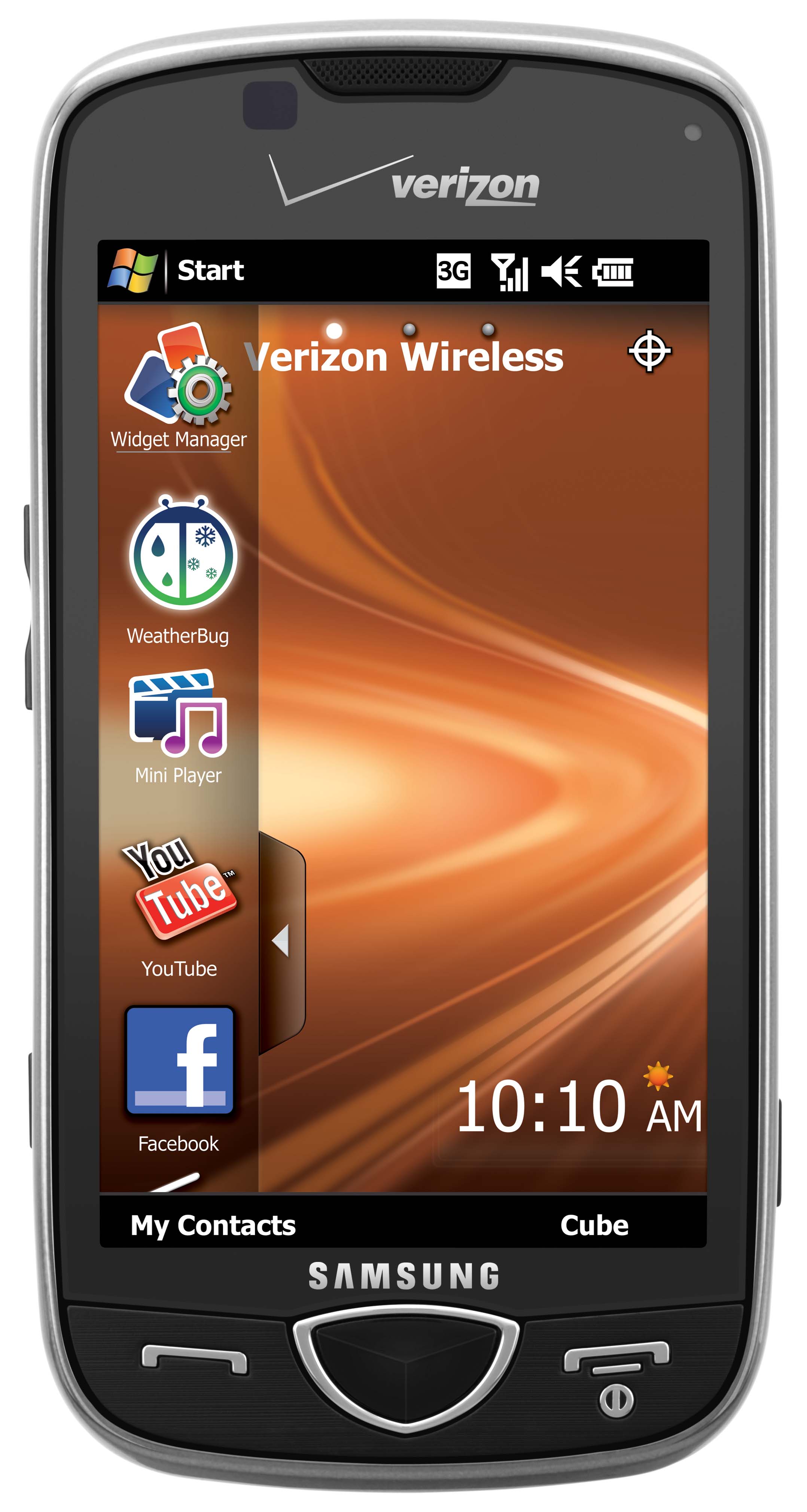
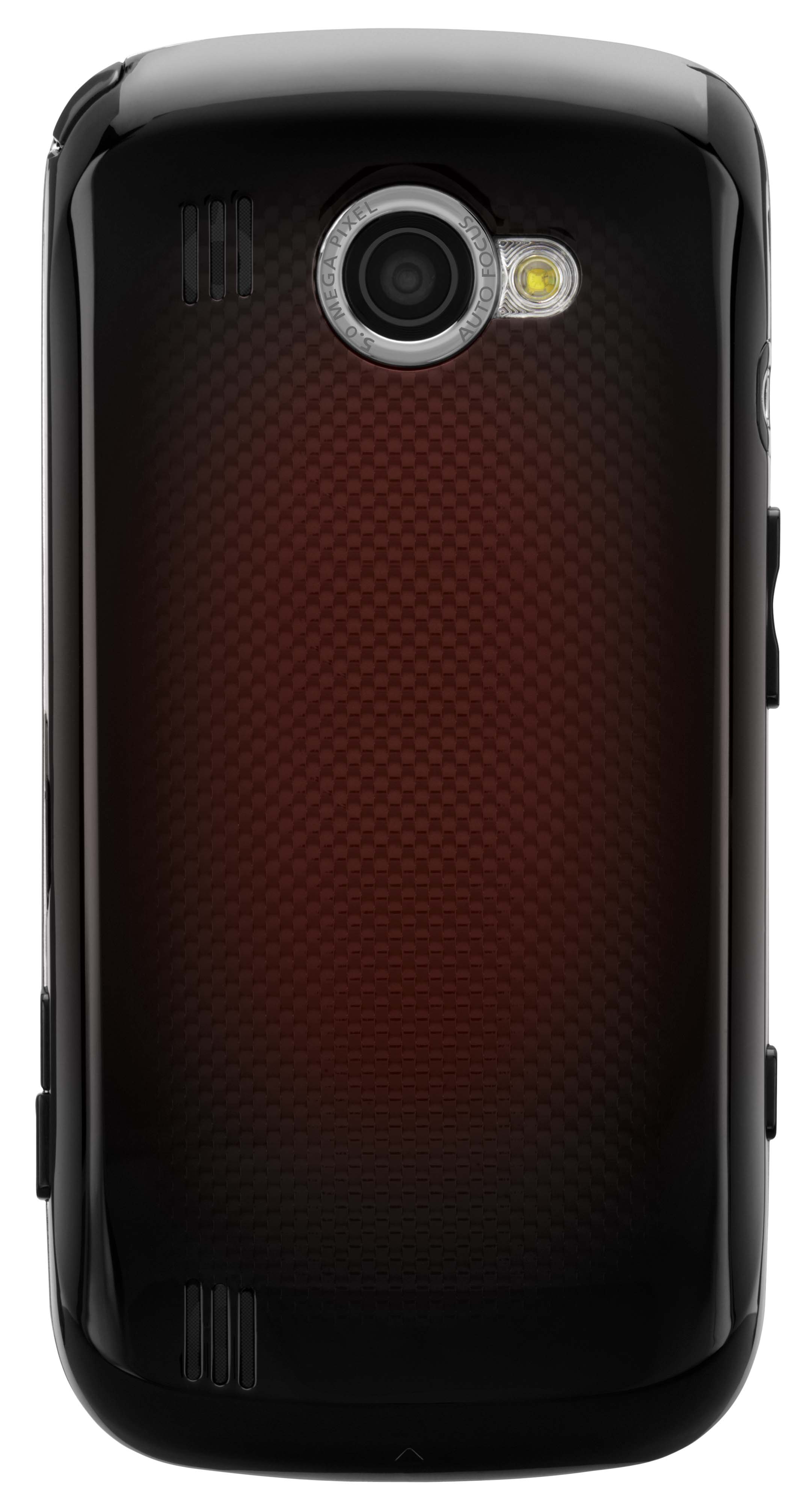
Opening the product box we're greeted by an uncluttered, some might even say "stylish" (though not us) handset. A little taller than your iPhone 3GS, although a shade thinner and narrower, the plastic is solid (doesn't feel like a toy), the silver running 'round the edges tasteful and understated, and the little bit of texture encompassing the handset buttons stands out and feels pleasant to the touch, unlike a similar (but less obvious) treatment on Sammy's Behold II. Also unlike the Behold II, this guy gets away with three front facing buttons (two handset controls and a center button select) to the Behold II's seven. Along the side lay the camera shutter button, lock / unlock button, and micro-USB port. On the backside we see an understated and easy to ignore red and black checkered finish, 5 megapixel camera, and a camera flash. Also included along the top, as one would expect, is a stylus.

Makin' calls
We can't really fault her here -- neither louder nor quieter than any other phone we've used lately, callers had no complaints about the call quality and neither did we. A couple speakerphone calls found the volume more than adequate. And to our delight, there were no silly missteps with the UI here: we've grown accustomed to having to make an extra step or two when placing calls on the Behold II, so it's a pleasure to actually be able to find contacts and then dial 'em up with a minimal amount of steps.
Interface

True, the Windows Mobile experience varies from phone to phone -- so it's not like we didn't expect TouchWiz to be all over this thing. We've had plenty of opportunities to play with various iterations of Samsung's beloved UI over the course of the year, from the odd dumphone to the Android-powered Behold II, and the implementation has been at best unremarkable, at worst a major inconvenience. With the Samsung Ultra Touch we encountered a more-than-capable phone that did little to excite us, but would be more than suitable for the target demographic. With the Behold II, we were taken aback: a more than capable OS was rendered less-than-useful by pervasive (and at times ill-considered) skinning. Sadly, it seems that the downward spiral has continued apace with the marriage of TouchWiz 2 and WinMo 6.5.

Unlocking the phone is a two step process: when you press the end call key or unlock key, you are again prompted to hit an unlock button on the touchscreen. This reviewer found himself constantly hitting the large center key first -- the way you would on any other phone, and then hitting the unlock key, making this essentially a three step process. Your mileage may vary, but we found it seriously annoying. Once inside the phone, one is easily overwhelmed by the apps and widgets coming at you from all directions -- either on the desktop (many of these widgets are little more than shortcuts to apps), in the redesigned Start menu (better use a stylus here, otherwise it's all too easy to select apps when you're trying to scroll past them), and in that painful Samsung "cube" interface. What's more, this handset -- an 800MHz beauty -- crawls along under the weight of all the excess baggage.
If all that weren't enough, the proximity detector doesn't work while TouchWiz is activated (which I learned after somehow switching the handset into airplane mode -- twice! -- while talking with the phone cradled between my ear and elbow), although it works like a champ when TouchWiz is deactivated.
Swype

As you've no doubt seen on these pages, Swype is a typing interface that uses predictive text software to guess which word you've typed while dragging (or "swiping") your finger back and forth between each letter. Swype does a very good job of predicting the correct word, and since its presence doesn't prevent you from using the keyboard in a traditional manner, we hope to see it on many more phones in the future.
If you check out the hands-on video that we ran last week (below), you can see a pretty good example of Swype in action.
Multimedia
The one area where the phone does fare well is as a multimedia device. The 3.7-inch touchscreen looks great and the colors are vivid, even if they're a little off (reds seem too strong, which we also noticed in camera / camcorder mode). But that ain't all: 8GB of onboard storage (above and beyond the microSD slot), native DivX/XviD support, FM radio with RDS, a standard 3.5mm audio jack with TV-out functionality, and DNSe and SRS sound are all solid features that should go a long way towards satisfying most anybody's portable media needs.

Samsung's camera interface is generally a winner, and this phone is no exception. It was also here that we noticed AMOLED display's preference for sharp reds: when using the camera, things tend to look considerably worse than when you display them, well, anywhere else. Indeed, this is a 5 megapixel cameraphone, so you can't expect too much from long shots or the digital zoom, but if you keep your subject close, stay in a well-lit area, and don't move around too much you'll get some pretty decent shots.
The same can be said for the video camera mode. We didn't get too much into it, but we do have a sample for you. (A warning for the faint of heart: a low-volume "f-bomb" can be heard at the tail end of the clip.)
Wrap-up
How can so much be right with a phone only to have the whole experience be so... wrong? An overburdened processor and some seriously strange UI choices have taken a device that should be just the thing for taking calls, listening to tunes, and taking the occasional picture or ten and made it a jittery, laggy, $200-on-contract whale. Of course, it's your call, but we think you deserve better than this.


Physical build
Opening the product box we're greeted by an uncluttered, some might even say "stylish" (though not us) handset. A little taller than your iPhone 3GS, although a shade thinner and narrower, the plastic is solid (doesn't feel like a toy), the silver running 'round the edges tasteful and understated, and the little bit of texture encompassing the handset buttons stands out and feels pleasant to the touch, unlike a similar (but less obvious) treatment on Sammy's Behold II. Also unlike the Behold II, this guy gets away with three front facing buttons (two handset controls and a center button select) to the Behold II's seven. Along the side lay the camera shutter button, lock / unlock button, and micro-USB port. On the backside we see an understated and easy to ignore red and black checkered finish, 5 megapixel camera, and a camera flash. Also included along the top, as one would expect, is a stylus.
Makin' calls
We can't really fault her here -- neither louder nor quieter than any other phone we've used lately, callers had no complaints about the call quality and neither did we. A couple speakerphone calls found the volume more than adequate. And to our delight, there were no silly missteps with the UI here: we've grown accustomed to having to make an extra step or two when placing calls on the Behold II, so it's a pleasure to actually be able to find contacts and then dial 'em up with a minimal amount of steps.
Interface
True, the Windows Mobile experience varies from phone to phone -- so it's not like we didn't expect TouchWiz to be all over this thing. We've had plenty of opportunities to play with various iterations of Samsung's beloved UI over the course of the year, from the odd dumphone to the Android-powered Behold II, and the implementation has been at best unremarkable, at worst a major inconvenience. With the Samsung Ultra Touch we encountered a more-than-capable phone that did little to excite us, but would be more than suitable for the target demographic. With the Behold II, we were taken aback: a more than capable OS was rendered less-than-useful by pervasive (and at times ill-considered) skinning. Sadly, it seems that the downward spiral has continued apace with the marriage of TouchWiz 2 and WinMo 6.5.
Unlocking the phone is a two step process: when you press the end call key or unlock key, you are again prompted to hit an unlock button on the touchscreen. This reviewer found himself constantly hitting the large center key first -- the way you would on any other phone, and then hitting the unlock key, making this essentially a three step process. Your mileage may vary, but we found it seriously annoying. Once inside the phone, one is easily overwhelmed by the apps and widgets coming at you from all directions -- either on the desktop (many of these widgets are little more than shortcuts to apps), in the redesigned Start menu (better use a stylus here, otherwise it's all too easy to select apps when you're trying to scroll past them), and in that painful Samsung "cube" interface. What's more, this handset -- an 800MHz beauty -- crawls along under the weight of all the excess baggage.
If all that weren't enough, the proximity detector doesn't work while TouchWiz is activated (which I learned after somehow switching the handset into airplane mode -- twice! -- while talking with the phone cradled between my ear and elbow), although it works like a champ when TouchWiz is deactivated.
Swype
As you've no doubt seen on these pages, Swype is a typing interface that uses predictive text software to guess which word you've typed while dragging (or "swiping") your finger back and forth between each letter. Swype does a very good job of predicting the correct word, and since its presence doesn't prevent you from using the keyboard in a traditional manner, we hope to see it on many more phones in the future.
If you check out the hands-on video that we ran last week (below), you can see a pretty good example of Swype in action.
Multimedia
The one area where the phone does fare well is as a multimedia device. The 3.7-inch touchscreen looks great and the colors are vivid, even if they're a little off (reds seem too strong, which we also noticed in camera / camcorder mode). But that ain't all: 8GB of onboard storage (above and beyond the microSD slot), native DivX/XviD support, FM radio with RDS, a standard 3.5mm audio jack with TV-out functionality, and DNSe and SRS sound are all solid features that should go a long way towards satisfying most anybody's portable media needs.
Samsung's camera interface is generally a winner, and this phone is no exception. It was also here that we noticed AMOLED display's preference for sharp reds: when using the camera, things tend to look considerably worse than when you display them, well, anywhere else. Indeed, this is a 5 megapixel cameraphone, so you can't expect too much from long shots or the digital zoom, but if you keep your subject close, stay in a well-lit area, and don't move around too much you'll get some pretty decent shots.
The same can be said for the video camera mode. We didn't get too much into it, but we do have a sample for you. (A warning for the faint of heart: a low-volume "f-bomb" can be heard at the tail end of the clip.)
Wrap-up
How can so much be right with a phone only to have the whole experience be so... wrong? An overburdened processor and some seriously strange UI choices have taken a device that should be just the thing for taking calls, listening to tunes, and taking the occasional picture or ten and made it a jittery, laggy, $200-on-contract whale. Of course, it's your call, but we think you deserve better than this.